Agents
Understand what an agent is in Flowtative, and find, filter, test or duplicate your agents from the Agents page.
An agent is the conversational assistant your customers talk to: it answers in writing in a chat or, if it is a voice agent, picks up the phone. In Flowtative, an agent brings together a language model, instructions (the prompt), capabilities (tools, memory, knowledge base, flow) and, for a callbot, a complete voice chain.
The building blocks of an agent
| Block | Role | Where to set it |
|---|---|---|
| Language model (LLM) | The "brain" that understands the request and writes the answer. You choose a Provider and a Model. | Identity & prompt |
| System prompt | The core instructions: role, goal, tone, guardrails. It can contain variables such as {{caller.name}}. See Write an agent's prompt. | Identity & prompt |
| Generation settings | Temperature, maximum answer length, conversation window, reasoning effort. | Generation |
| Capabilities | ReAct reasoning, tool calls, memory, JSON structured output, audit log. | Capabilities |
| Knowledge | A knowledge base queried to answer from your own content (RAG). | Knowledge (RAG) |
| Linked flow | A conversation journey designed in the flow editor and run by the agent. | Linked flow |
| Skills | Blocks of instructions the agent loads only when it needs them. | Skills |
| Voice | Speech transcription (STT), voice synthesis (TTS), turn-taking, end of call. Callbots only. | Voice · callbot group |
Chat agent or callbot
Every agent can converse in writing. An agent becomes a callbot (voice agent) when you click Enable voice (callbot) in its editor: the Voice · callbot group then appears in the left menu, with the transcription, voice synthesis and hang-up settings. Templates marked with a microphone icon are already callbots.
Note
A callbot can only be reached by phone if an inbound number is attached to it. You attach numbers in Settings > Telephony & Trunk; the agent editor shows the attached number as read-only.
The Agents page
Open Agents in the sidebar. The page lists all your company's agents as cards, nine per page. The counter next to the title shows the total number of agents.
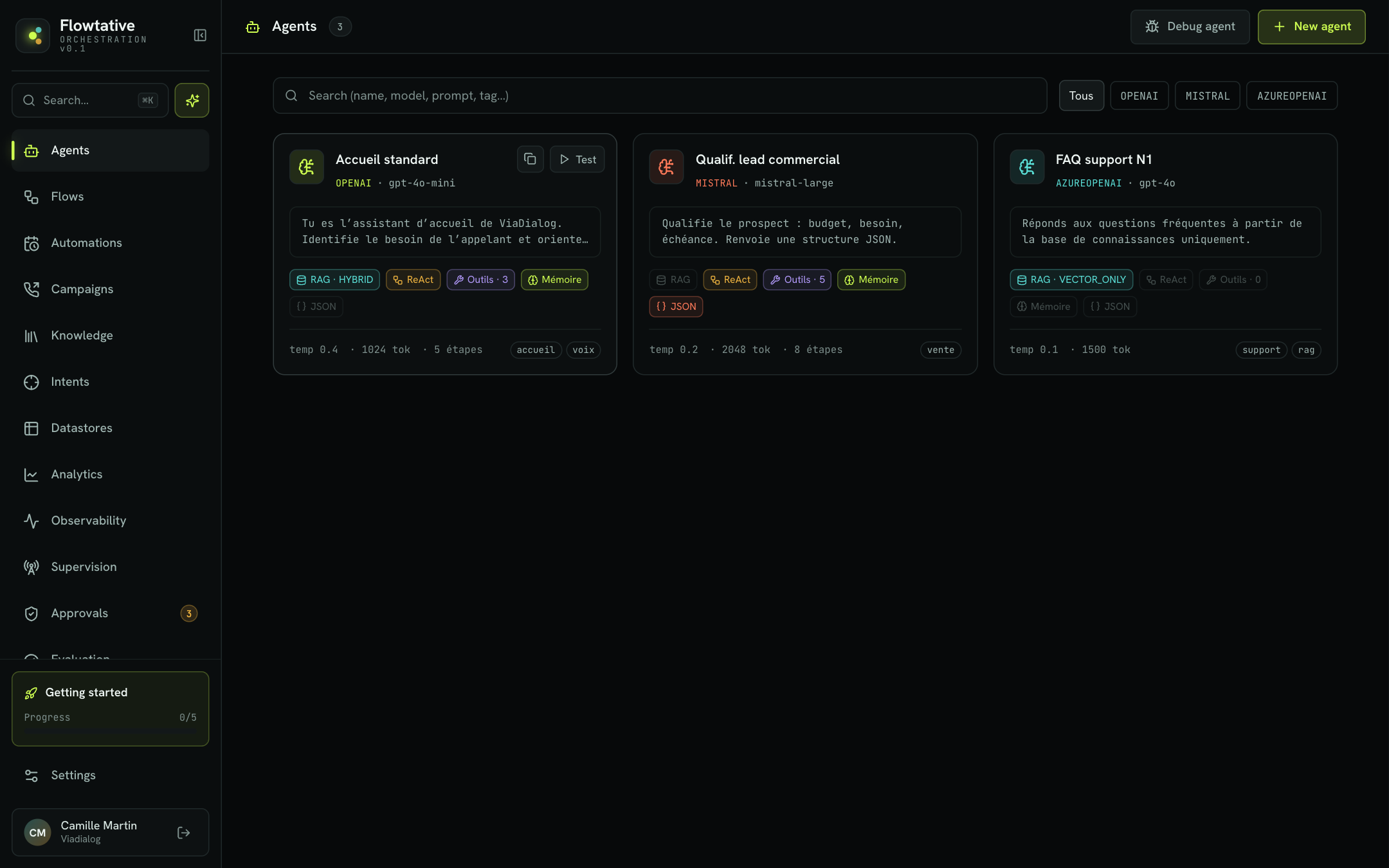
Reading an agent card
Each card sums up the agent's configuration:
- Header: the agent's name, its provider (for example
OPENAI,MISTRAL) and its model. - Prompt excerpt: the first two lines of the system prompt.
- Capability badges: lit when the capability is on, greyed out otherwise.
| Badge | Meaning |
|---|---|
| RAG | The agent queries a knowledge base. The search type is shown next to it (for example RAG · HYBRID). |
| ReAct | Looped reasoning (think, then act) is on. |
| Tools | Tool calls are on; the number of linked tools is shown next to it. |
| Memory | The agent keeps the conversation context. |
| JSON | The agent answers according to a structured output schema. |
- Card footer: the temperature (
temp), the maximum number of tokens (tok), the number of reasoning steps, and up to three tags.
Click anywhere on the card to open the agent editor.
Search and filter
- The Search (name, model, prompt, tag…) field filters agents on their name, model, provider, prompt and tags. Search ignores accents: "jeremie" finds "Jérémie". The number of results is shown in the field.
- The provider buttons (All,
OPENAI,AZUREOPENAI,MISTRAL…) limit the list to one provider. They only appear when several providers are represented. - The Reset button clears the list filters.
Tip
Your search, your filter and the page shown are kept when you open an agent and come back to the list, and even after a page reload.
Quick actions
Hover over a card to reveal two buttons:
- Test opens the agent's test panel without leaving the list. See Test an agent.
- The copy icon (Duplicate agent) creates a copy. A Duplicate this agent? window suggests a Copy name (the original name followed by "(copy)") before you confirm with Duplicate.
At the top right of the page:
- New agent opens the creation screen. See Create and configure an agent.
- Debug agent opens the assistant to diagnose an existing agent. See Agent creation assistant.
Example: a customer service center
A customer service team usually sets up several complementary agents rather than a single do-it-all agent:
| Agent | Channel | Typical configuration |
|---|---|---|
| Main reception | Voice | Callbot, transfer tool, memory, short prompt focused on routing. |
| Tier-1 support FAQ | Chat | RAG on the "Support FAQ" base, low temperature (0.1 to 0.3), no tools. |
| Lead qualification | Chat or voice | JSON structured output (budget, need, timeline), CRM tools. |
Tags (reception, support, sales…) then help you find each family of agents in the list.
Best practices
- One agent, one mission. A focused prompt gives more reliable answers than a prompt that covers every case. See Write an agent's prompt.
- Duplicate before experimenting. To try another model or prompt without touching the agent in production, duplicate it and work on the copy.
- Name clearly. The agent's name appears in the campaign, automation and flow selectors.
Learn more
Create and configure an agent
Create an agent from scratch or from a template, then set its model, prompt, capabilities, knowledge, flow and webhooks.
Configure a callbot's voice
Set the transcription, voice synthesis, pronunciation, turn-taking and end of call of a voice agent.
Test an agent
Talk to an agent in writing or by voice, inject test variables and turn on the diagnostic log before going live.
Agent creation assistant
Create a complete agent by describing your need in plain language, or have the assistant diagnose an existing agent.