Transfer to an advisor
Hand a call over to an advisor at the right time, plan fallback branches for when the AI cannot conclude, and track transfers.
A good AI agent knows when to hand over: the caller asks for a human, the request is out of scope, a tool does not respond. In a flow, a transfer is an ending like any other: a Hang up block that, instead of ending the call, transfers it to a number.
This page explains how to set up this transfer, how to lead the conversation to it in each fallback situation, and how to track transfers once in production.
Before you start
- Call transfer applies to voice calls. In chat, the transfer parameters are only received with the end of the session.
- Have the number to transfer to at hand, in international format (
+33123456789), and the transfer mode your telephony accepts (see BRIDGE or REFER).
When to transfer
| Situation | How the flow detects it | What you configure |
|---|---|---|
| The caller asks for an advisor | The AI understands the request | A transition function to the transfer block, described for this case |
| The request is not understood | The AI gets no usable answer after rephrasing once | An instruction in the prompt and a transition function |
| The request is outside the agent's scope | The AI notices it, according to its prompt | An instruction in the prompt and a transition function |
| A business rule requires it (emergency, premium customer) | A value stored in the variables | A Conditional Output on this value |
| A tool fails or returns nothing | The AI sees the tool's result | An instruction in the description of the transition function |
| A human validation gets no answer | The Human validation block takes its Timeout output | A link from this output to the transfer block |
Set up the transfer
Add the transfer block
- From the Library, drop a Hang up block onto the canvas.
- In Block label, name it "Transfer advisor". This label also names the transition generated toward this block (
aller_transfer_advisor), the one the AI reads: make it explicit.
Announce the transfer
In Farewell message, write the sentence said to the caller before the transfer, for example "I'm putting you through to an advisor, please hold.". It is said as is, without going through the model. Left empty, the transfer happens without an announcement.
Configure the transfer
- Under End parameters, click Call transfer. Two rows appear: Transfer number and Transfer mode.
- Enter the number in Transfer number, for example
+33123456789. - Choose the Transfer mode: BRIDGE or REFER.
The block's summary on the canvas then shows "→ transfert" followed by the number and the mode.
Keep track of the reason
Click Parameter (Free parameter when the list is empty) and type the key endReason: the row is then titled End reason. Give it a fixed value that describes why the call was transferred, for example advisor_request or emergency. It is recorded on the session's transcript. Create one transfer block per reason if you want to tell them apart.
Lead the conversation to it
Draw a link to this block from every block where a transfer is possible: the Reply output of an LLM agent, a function's output, the Timeout output of a Human validation. See Trigger the transfer.
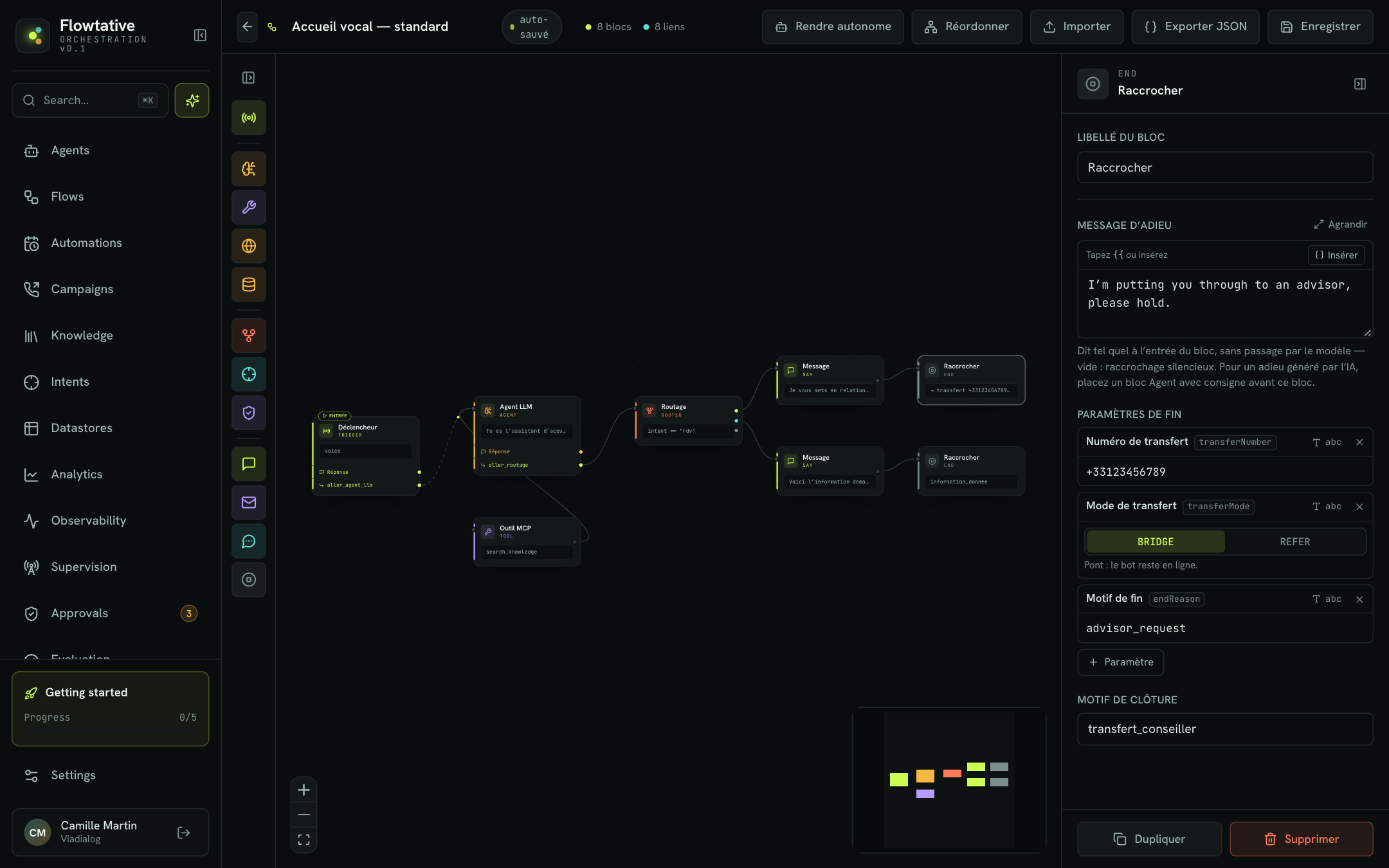
BRIDGE or REFER
| Mode | How it works | Good to know |
|---|---|---|
| BRIDGE | Bridge: the bot stays on the line and connects the caller to the advisor. | Mode offered by default. |
| REFER | SIP referral: the bot leaves the call, which is handed to the destination number. | Your telephony must accept this referral. |
If you are not sure which one to choose, ask your telephony administrator which one your setup accepts, then test with a real call.
A number that depends on the call
The transfer number can be read from the conversation's variables. Click abc next to Transfer number to switch to path, then enter a path, for example state.parameters.branch_number: the value stored earlier by a state write, such as the branch number found in your database.
Closing reason and endReason
The Hang up block also offers a Closing reason field. They are two different things:
| Field | Role |
|---|---|
| Closing reason | A marker for your team, shown on the block in the canvas when no transfer is configured. It is not passed on at the end of the conversation. |
endReason end parameter (End reason row) | A value passed on at the end of the conversation and recorded on the session's transcript. |
Trigger the transfer
A conversational block only moves to the next block if the AI calls a transition function. Three ways to lead the AI there:
| Way | How | Example |
|---|---|---|
| Automatic transition | Draw a link from the block's Reply output to "Transfer advisor". Flowtative generates the aller_transfer_advisor transition. | A reception agent that can always hand over. |
| Customized transition | In Automatic transitions (links), click Customize and rewrite its description, which the AI reads. | "Call this function if the customer asks for an advisor, gets upset, or if you cannot answer after two attempts." |
| Conditional output | On a function, choose Conditional Output and a branch on a variable. | state.parameters.urgent = equal to yes to "Transfer advisor". |
Always add an instruction in the Task prompt: "If the customer asks to speak to someone, don't try to keep them: transfer them."
Plan fallback branches
A fallback branch is the path the conversation takes when the planned journey cannot succeed. There is no automatic switch to another agent or another model: the fallback is built in the flow, most often toward a transfer block or a message that promises a callback.
The request is not understood
Leave this case to the LLM agent that leads the exchange. In its Task prompt, ask it to rephrase the question once, then to transfer if the answer is still unclear: "If you don't understand the request after rephrasing once, offer to put the caller through to an advisor." Add a transition function from this block to the transfer block, described for this case: "When the request is still not understood after rephrasing once".
A tool fails
When a function calls a tool, the AI sees the result returned, including an empty result or an error. Tell it what to do in that case:
- in the Task prompt: "If the order search returns nothing or fails, apologize and offer to put the customer through to an advisor";
- and in the description of the transition to "Transfer advisor": "… or if a tool failed".
Action blocks (MCP tool, Datastore, SMS, Email) have a single output: they offer no error branch. Place a conversational block after them that can notice an unexpected result.
Warning
The HTTP request block has two outputs, Success (2xx) and Error / timeout, but its settings are not executed during a conversation: don't build a fallback on its error output. To call an API, create an HTTP / API tool and call it from a function (see Tools).
A validation gets no answer
The Human validation block takes its Timeout output when no operator has decided within the Max delay (s). Link it to a Message that tells the customer they will be called back, or directly to the transfer block. A task distributed to a ViaFlow agent must be closed on this branch: see Distribute to a ViaFlow agent.
Bring in a human without transferring the call
A voice transfer is not the only way to bring in a human. The Human validation block keeps the conversation with the AI agent and only hands the decision to the human:
| Need | Building block |
|---|---|
| A supervisor approves a commercial gesture or a refund, the agent announces the decision | Human validation block, request handled in the Approvals console. See Human approvals. |
| The agents of a ViaFlow service receive the decision to make | Distribute to a ViaFlow agent option of the same block, with the target Service. |
| The agent promises a callback instead of transferring | An MCP tool block that creates the callback task in your support tool or CRM, then a Hang up block whose Farewell message announces the callback and that carries an endReason = callback_promised. See Tools. |
Tip
During a validation, the caller waits. Have them warned just before with a Message: "I'm checking with a manager, it will take a minute."
Track transfers
| Where | What you see |
|---|---|
| Analytics > Human handoff metric | The share of sessions handed off, and its change against the previous period. |
| Analytics > Top drop-off nodes, Handoff tab | The flow steps handoffs start from. A node that concentrates many of them points to a step where the agent cannot conclude. |
| Analytics > End reasons | Each session's end code (for example transfer) and its outcome. See End reasons. |
| Transcripts | The Transferred end reason in the conversation header, and the exchange that came before the transfer. |
Start from the Top drop-off nodes: if the "Order tracking" step transfers too often, read a few transcripts from that step to see whether a tool fails, a question is misunderstood or the request is out of scope.
Frequently asked questions
Check in the Hang up block that the Transfer number row does contain a number (or a path that exists at that point of the conversation) and that the conversation was a voice call. Then test the mode: if REFER is not accepted by your telephony, try BRIDGE.
The block the conversation is in probably has no transition to the transfer block. Draw a link from its Reply output, or customize the transition to describe precisely when to call it.
Create one Hang up block per destination, each with its number and its endReason, and lead the conversation there with one transition function per reason, each described for its case. For a number found in a base, use a state.parameters.… path as the Transfer number.
In the agent, End of call section, check that Wait for the end of the message before hanging up is on. See Configure a callbot's voice.
Best practices
- Always leave a way out. Every conversational block of a voice journey should be able to lead to a transfer or a clean ending.
- Don't hold the caller back. A customer who asks for a human and doesn't get one abandons: that weighs more on your Abandon rate than a transfer does on your resolution rate.
- One
endReasonper transfer reason, so that when you read sessions back you know why the agent handed over. - Test every fallback branch, including by simulating a tool that does not respond, before publishing the flow.