What's new
Flowtative's changes month by month, with a link to the page that details each new feature.
This page lists the changes to Flowtative that you can see in the application, from the most recent to the oldest. Each entry says what the change brings you and links to the documentation page that details it.
Note
Changes are grouped by the month they became available.
October 2026
New features
- Outbound call campaigns. Have an AI agent call a list of contacts, within a calling window that complies with legal hours, with automatic retries and the caller ID of your choice. Before launching, Call me to test lets you receive the agent's call yourself. See Outbound call campaigns and Create a campaign.
- Campaign tracking. A campaign's page shows the audience, remaining contacts, reached contacts and answer rate (refreshed every 15 seconds while the campaign is Running), as well as each contact's status, with the country flag in front of the number. See Track and manage a campaign.
- Debug an agent with the assistant. The Debug agent button (agent list) or Debug (editor) hands the agent over to the assistant: it analyzes its configuration, flow, tools and five most recent conversations, then suggests a diagnosis. No fix is applied without your approval. See Agent creation assistant.
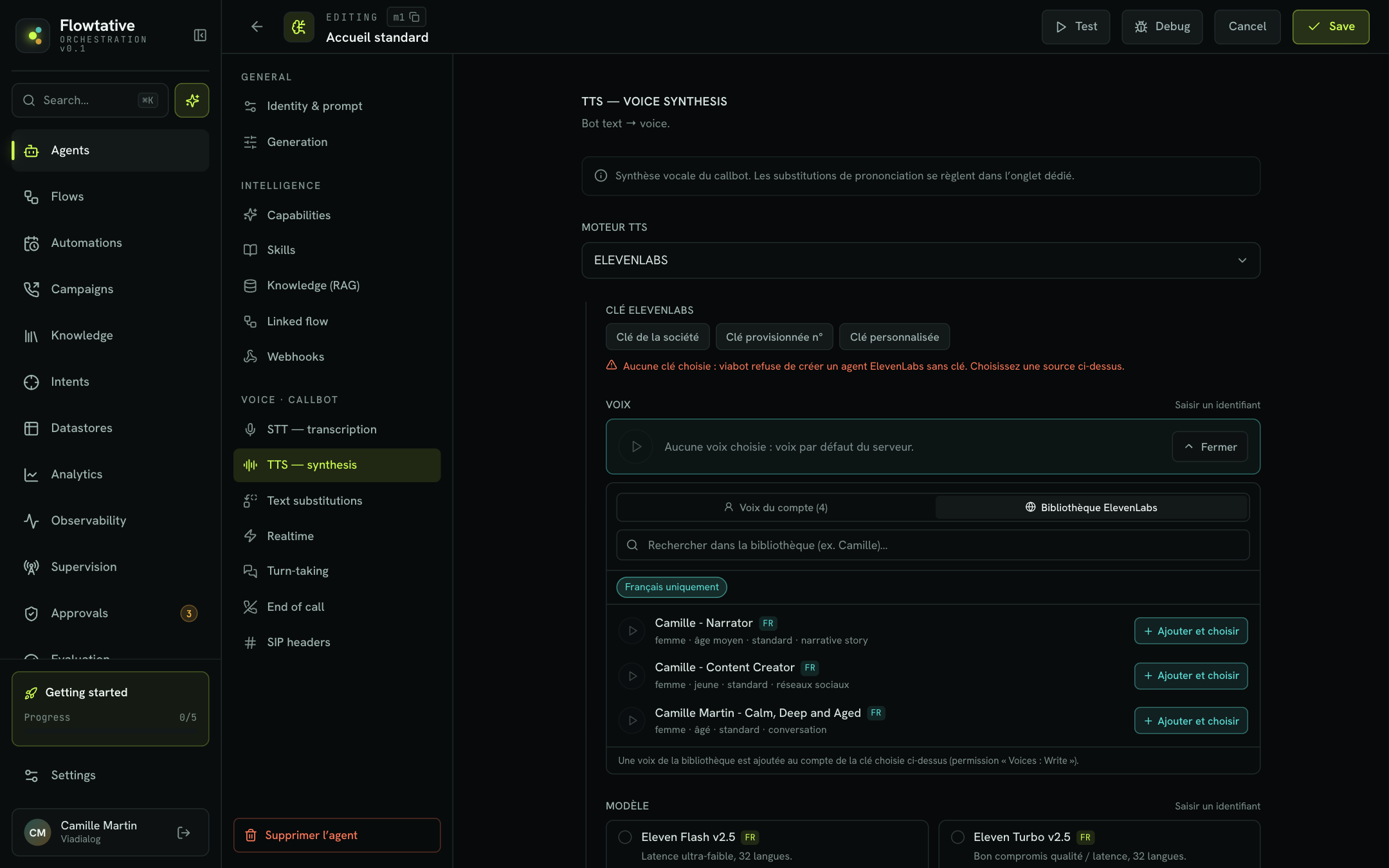
- ElevenLabs voice library. When choosing a callbot's voice, the ElevenLabs library tab gives access to public voices, with a French only filter and a sample to listen to. Add and choose adds the voice to your account and assigns it to the agent. See Configure a callbot's voice.
- Listen to the voice before saving. Listen with these settings synthesizes a test sentence with the current voice, model and settings: you hear the result without placing a call. See Configure a callbot's voice.
- Search tool created automatically for the linked base. When you connect a knowledge base to an agent, Flowtative creates (or reuses) its search tool and attaches it to the agent. A callbot can then use the base over the phone, with no extra setup. See Connect a base to an agent.
- A flow's tools added to the agent. Linking a flow to an agent adds the tools the flow calls to the agent's capabilities: no need to attach them one by one. See Tools.
- PowerPoint and Excel import. The File tab of knowledge bases now accepts presentations and spreadsheets, in addition to PDFs, Word documents and text files. See Knowledge bases.
- Automatic website refresh. A Website source can be re-crawled and re-indexed every week, month or quarter: your answers keep up with updates to your site. See Knowledge bases.
- Mindsay connector. Import your Mindsay bases into a knowledge base. Changes to a published article arrive within seconds, thanks to real-time updates. See Settings and connectors.
- Approval distributed to a ViaFlow agent. The Human validation block can hand the decision over to the agents of a ViaFlow service: the flow waits for their answer, or for the maximum delay. See Block reference.
Improvements
- Transcripts easier to find. Choose the Last 30 days or 1000 most recent window, filter by Channel (Voice or Chat), and search by bot name too. See Transcripts.
- Line-by-line replay. Each line of a call can be replayed on its own, and Download this passage saves it as a WAV file. The bot's track is better aligned with the conversation thread. See Transcripts.
- Formatted bot messages. In transcripts, the bot's answers are shown with their formatting (bold, lists, line breaks). See Transcripts.
- Voice settings adapted to the model. Only the settings the chosen ElevenLabs model accepts are offered, and the editor warns you when a model is not designed for real time. See Configure a callbot's voice.
- Full-screen block prompts. The Expand button opens a block's prompts and messages in a full-screen editor, with the list of flow variables and a character and token counter. See The visual editor.
- Lists that keep your filters. Your search, filters and current page are kept when you open an item and come back to the list, and after a reload. Search also ignores accents: "jeremie" finds "Jérémie". See Agents.
- Agents at the top of the menu. Agents is the first entry in the sidebar and the page that opens when you sign in. See Getting around the interface.
- Wider test panel. The Test the agent panel switches to full width in one click, or resizes when you drag its edge; the width is remembered. See Test an agent.
- Date picker in databases. Date fields are filled in with a date picker, with no risk of a wrong format. See Databases (Datastores).
- A base's tools updated in one click. After a change to a base's schema, a banner flags the tools that no longer reflect it, and Update linked tools fixes them without touching the flows that use them. See Databases (Datastores).
- Observability on your real data. Metrics and traces are based on your agents' audit log. An active agent whose audit is off is shown as not audited, instead of being missing. See Observability.
- More accurate supervision counter. Sessions left open with no activity are grouped at the bottom of the list and no longer count as ongoing calls. See Live supervision.
- Easier-to-read Analytics. The period picker offers a calendar that stays on screen, Outcomes by configuration shows the agent's name, and an indicator flags the panels still loading. See Analytics.
Fixes
- Deleting a flow linked to agents is refused, with the list of the agents concerned and a link to each. See Flows.
- Deleting a database used by an agent or a flow is refused, with the list of items to detach, instead of erasing a base still in use. See Databases (Datastores).
- Saving a flow without changing it no longer alters it. See Save and publish.
- Test variables are passed the same way in chat and in voice. See Test an agent.
- The tester always opens the agent's latest saved version, tools included. See Test an agent.
September 2026
New features
- Agent creation assistant. Describe your need in plain language: the assistant asks its questions, then creates the agent and its components. Every template can also start With the assistant. See Agent creation assistant.
- Skills. Write reusable know-how (conditions, information to ask for, rules) and attach it to your agents from Settings > Skills. See Skills.
- Automations on your agents. Put an agent to work without an inbound call: on a schedule, or when an external system asks for it through an API call. Every run is tracked. See Automations.
- Databases. Create tables (customers, appointments, orders), import a CSV and generate the tools that let an agent search, add or edit records. See Databases (Datastores).
- Datastore block. A flow reads from or writes to a base without going through the model: for example, to find the caller's record from their number. See Block reference.
- End-of-session webhooks. Receive the transcript of every call in your CRM or business tool, with a signature to verify and a log of failed deliveries. Create a webhook for this agent creates and attaches it from the agent editor. See Webhooks.
- SIP trunks. Declare your company's phone system (PBX) and its numbers in Settings > Telephony & Trunk, then track each trunk's synchronization state. See Telephony.
- Debug mode and diagnostic log. The tester's Debug switch adds the flow's internal steps (nodes visited, variables, writes) to the transcript, so you can understand why an unexpected branch was taken. See Test an agent and Transcripts.
- Phone keypad (DTMF). Each block can accept the caller's keypad presses, for example to enter a customer number. See Block reference.
- Messages recited word for word. The Message block can enforce an exact text (Recite word for word) and move on without waiting for a reply: ideal for a legal or recording notice. See Block reference.
- Customizable automatic transitions. A transition generated from a link becomes an editable function with Customize: description, state writes, conditional output. See The visual editor.
- Duplicate a block.
⌘D/Ctrl+Dor Duplicate creates a copy of the block with its full configuration and outgoing links. See The visual editor.
Improvements
- Adjustable conversation memory. Conversation window and Memory mode set how much of the exchange the model keeps in mind. See Create and configure an agent.
- Live answers in the tester. In chat, the agent's answer appears as it is being written. See Test an agent.
- API key in three modes. Use your company's default key (the agent benefits from its renewal without any change), a specific company key identified by its number, or a key of the agent's own. See Create and configure an agent.
- Inbound number shown on the agent. The Identity & prompt section shows the number connected to the agent. See Create and configure an agent.
- Visual cues in the editor. The Entry badge shows the block where the conversation starts, and the No next step badge flags an action block that still needs a link. See The visual editor.
- Richer transcript details. Each conversation has its own address, to share with a colleague, and the keys the caller presses on their keypad appear in the thread. See Transcripts.
- Confirmation before duplicating. Duplicating an agent, a flow or an evaluation grid now asks for confirmation. See Agents.
- Duplicate a tool. An existing tool serves as the starting point for a new one, from Settings > Tools. See Tools.
- Theme in the settings. The light, dark or automatic theme is chosen in Settings > Profile. See Getting around the interface.
- Profile time zone. Choose your time zone in Settings > Profile. See Settings and connectors.
- The agent editor stays open after saving. You keep tuning the agent without reopening it. See Create and configure an agent.
- Editable contact bases. Records in a contact base can be added and edited directly in the table. See Databases (Datastores).
August 2026
New features
- Human approvals. The Human validation block puts a flow on hold until a person decides (commercial gesture, refund…). Requests are handled in the Approvals console, with a badge in the menu and browser notifications. See Human approvals.
- Call transfer and end parameters. The Hang up block can transfer the call to a number and record end parameters on the conversation. See Transfer to an advisor and Collect information.
- Inbound numbers connected to an agent. Connect a phone number to an agent: when a customer dials that number, the agent answers. See Telephony.
- Flow version history. Every save creates a version. Preview an older version read-only, then restore it if needed, without losing any history. See Save and publish.
- SMS and Email blocks. A flow sends a text message or an email during the conversation, for example to confirm an appointment. See Block reference.
- Flow variables in prompts and conditions. Functions can write state variables, which the prompts and conditions of the following blocks can then reuse. See The visual editor.
Improvements
- Explicit flow version. An agent follows its flow's latest version, or a pinned version: you always know which one runs. See Save and publish.
- Better readability. Secondary text has more contrast and the live supervision thread is easier to read. See Live supervision.
Fixes
- After importing a question / answer CSV, the document list updates once indexing is done. See Knowledge bases.
July 2026
New features
- Interface in ten languages. Flowtative is available in French, English, Spanish, German, Italian, Portuguese, Dutch, Polish, Arabic and Russian. The language is chosen in Settings > Profile. See Getting around the interface.
- Live supervision. Follow ongoing calls and conversations, line by line, with the tools the agent calls. See Live supervision.
- Observability. Track each agent's volume, latency, tools and estimated cost, and analyze a conversation step by step with traces. See Observability.
- Analytics. A dashboard of your agents' sessions, filterable by period and agent: volumes, channels, end reasons, drop-off nodes. See Analytics.
- Getting started journey. A guided journey takes you from creating your first agent to adding a number. See Your first agent.
- Agent templates. Start from a ready-made template, sorted by use case, industry or capability, and adapt it. See Create and configure an agent.
- MCP servers and tools. Declare your MCP servers, turn their tools into Flowtative tools and attach them to your agents. See Settings and connectors and Tools.
- Structured output. An agent can answer following a JSON schema you define, to feed another system directly. See Create and configure an agent.
- Choice of speech synthesis engine. A callbot speaks with ElevenLabs or ViaSpeech, your choice. See Configure a callbot's voice.
- Mayday, Zendesk and Stonly connectors. Import articles from these tools into your knowledge bases. See Settings and connectors.
- Google Calendar connector. Connect one or more Google calendars so your agents can check availability and book appointments. See Settings and connectors.
- Team. Manage the members of your workspace, their roles and their status. See Team and roles.
Improvements
- Transcript replay and export. Replay a call's recording and export a conversation as CSV or JSON. See Transcripts.
- Knowledge base content. Track each document's indexing status and start from the question / answer CSV template, downloadable from the import. See Knowledge bases.
- Safer knowledge base deletion. Deleting a base asks you to type its name. See Knowledge bases.
- Reasoning effort. For reasoning models, set the effort in the agent editor. See Create and configure an agent.
- Flow import and graph layout. Import creates a flow from a JSON file, and Rearrange lays out the blocks automatically. See Save and publish and The visual editor.
- Keyboard shortcuts. Move around the application with the keyboard. See Getting around the interface.
- Profile picture. Add an avatar to your profile. See Settings and connectors.
- Duplicate an evaluation grid. Start from an existing grid to create a new one. See Evaluations.
June 2026
New features
- Flowtative launch. Create your AI agents, choose their model and prompt, then test them in chat and by voice from the editor. See Your first agent.
- Flow editor. Build the course of a conversation visually, block by block. See Flows.
- Knowledge bases. Import PDFs, question / answer CSVs and websites so your agents answer from your own content. See Knowledge bases.
- Transcripts. Read every conversation of your agents again and replay calls. See Transcripts.
- Evaluations. Have your conversations scored by a judge agent against your quality grids, generate questions with AI, evaluate in bulk and spot quality drifts. See Evaluations.
- Command palette.
⌘K/Ctrl+Kopens the palette to go to any page, and Ask AI gives quick help on Flowtative's main features. See Getting around the interface. - Webhooks and telephony. Manage your webhooks and inbound numbers from the settings. See Webhooks and Telephony.