Write an agent's prompt
Write a clear system prompt for a voice or chat agent, with a template to copy, phone-specific rules, common mistakes and a method to improve it in the tester.
The system prompt is your agent's briefing sheet. Picture the one you would hand a new advisor before their first day on the phones: which company they answer for, why customers call, how to handle the conversation, what they must never do and how to wrap up. The agent relies on these instructions to phrase each of its replies, without ever reading them out loud.
Writing a good prompt requires no technical skills. Be concrete, avoid contradictions and, for a callbot, keep in mind that everything happens out loud.
Where to configure the prompt
You enter the prompt in the agent editor:
- Open Agents, then the agent to edit (or click New agent).
- In the left menu, General group, click Identity & prompt.
- Write your instructions in the System prompt field ("The agent's core instructions. Use {{variables}} for call context.").
- Click Save (or Create agent when creating it).
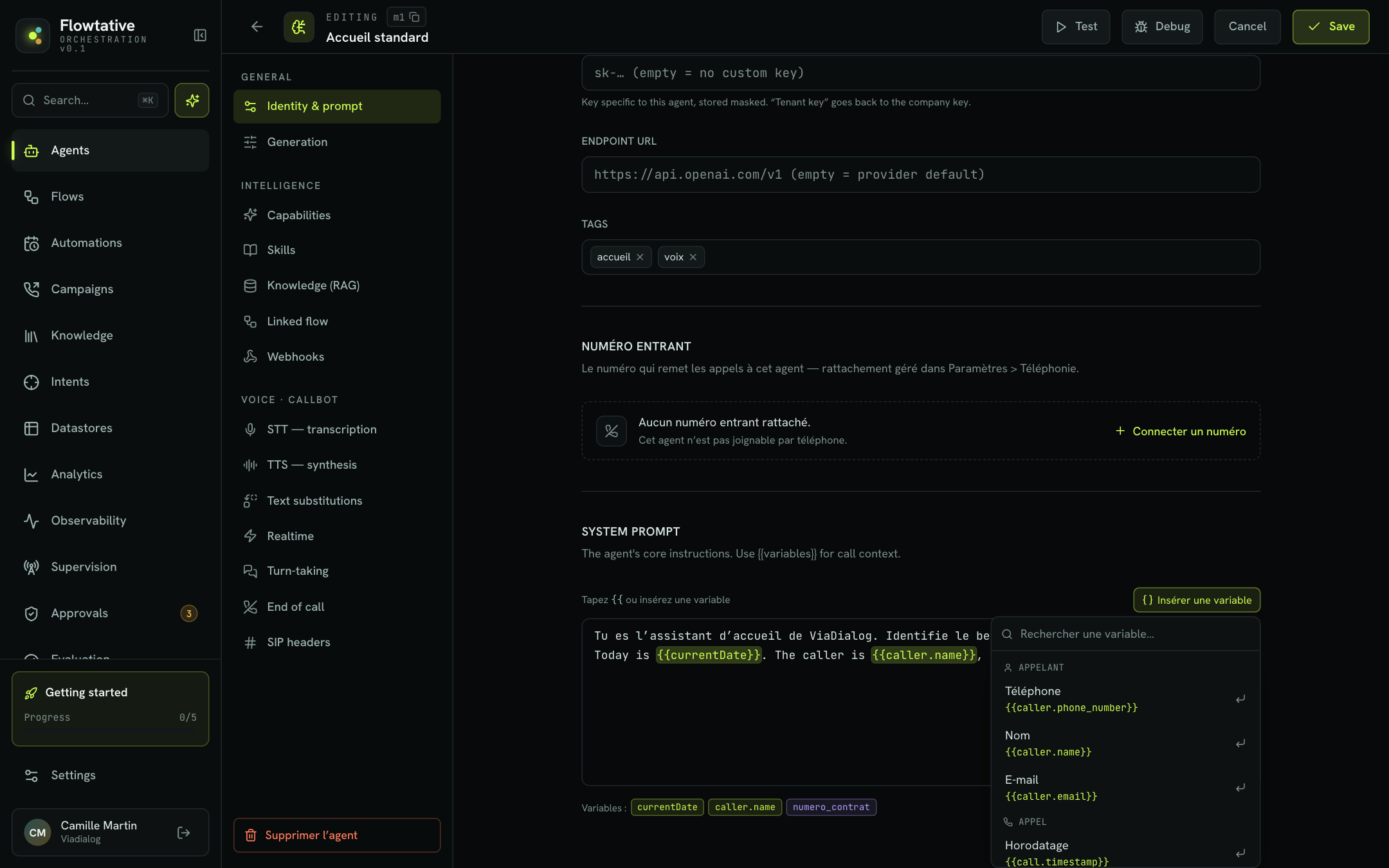
Variables in double curly braces, such as {{company}} or {{caller.name}}, are replaced with their value in each conversation. Type {{ in the field or click Insert a variable to pick from the list (Caller, Call and Context groups). Below the field, the Variables: line sums up the ones the prompt uses: standard variables in one color, custom variables (provided at run time, such as {{numero_contrat}}) in another. The full list, and what happens when a value is missing, is in Variables and dynamic data.
Welcome message or prompt?
A Flowtative agent has no separate "welcome message" field. Depending on what you want, the opening of the conversation is set in one of these places:
| You want… | Where to configure it |
|---|---|
| The agent to greet the caller in its own words, in the right tone | An opening instruction in the System prompt ("Call flow" section of the template below). |
| To set precisely what the agent does when the call connects or the chat opens | The Task prompt of the Trigger block, in the flow linked to the agent. |
| To have an exact sentence said, identical on every call (recording notice, GDPR information) | A Message block in the flow, with Recite word for word on. |
Tip
A sentence that must be said as is should not depend on the model: put it in a Message block with Recite word for word. The prompt describes a behavior; it does not dictate a script.
What doesn't belong in the prompt
The prompt is not the agent's only setting. Each need has its place, and a lighter prompt is followed more closely.
| Need | Right setting |
|---|---|
| Answer from a large amount of information (catalog, terms and conditions, full FAQ) | A knowledge base linked to the agent. |
| Look up a file, an order, a calendar | Tools linked to the agent or called by the flow. |
| Follow a strict, step-by-step path | A flow: each block has its own Role prompt and Task prompt. |
| Transfer the call to a number | The flow's Hang up block, End parameters > Call transfer, see Transfer to an advisor. |
| Return information in a fixed format (reason, score, budget) | The agent's Structured output (JSON), see Create and configure an agent. |
| Fix the pronunciation of an acronym or brand name | The callbot's Text substitutions, see Configure a callbot's voice. |
| Let the caller finish their sentences without being cut off | The callbot's Turn-taking, same page. |
The template to copy
Start from this template and replace the content with your own. The headings at the start of each section help the model find each type of instruction; keep them even when a section is short. The example is a fictitious health insurer, on inbound calls.
# Identity
You are Claire, the phone assistant for {{company}}, a health insurance provider.
You answer members who call customer service.
You always address the caller formally. Your tone is warm, calm and efficient.

# Context
- Today is {{currentDate}}.
- Customer service is open Monday to Friday, 9 am to 6 pm.
- A reimbursement is paid within 5 business days of receiving the claim form.
- Members have an 8-digit member number, printed on their card.

# Reasons for calling
Members mostly call to:
1. Track a reimbursement.
2. Get a certificate or a new direct-billing card.
3. Change their details (address, bank details).
4. Make a complaint.
For any other reason, offer to transfer the call to an advisor.

# Call flow
1. Greet the member, introduce yourself in one sentence and ask why they are calling.
2. Identify the reason. If the request is unclear, ask a single question to clarify it.
3. Ask for the member number, then repeat it digit by digit to have it confirmed.
4. Handle the request: give the useful information in one or two sentences.
5. Check that the answer works for them, then ask if there is anything else.

# Rules
- Never give a reimbursement amount: it depends on each member's contract.
  If asked, offer a transfer to an advisor who has access to the contract.
- If you don't know the answer, say so plainly and offer a transfer. Never make up information.
- For a change of bank details, don't collect them over the phone:
  explain that the change is made in the member area.

# What you never do
- You never give medical advice.
- You never share information about any member other than the person you are speaking to.
- You never promise a timeframe other than those given in the context.

# Wrap-up and transfer
- Before wrapping up, sum up in one sentence what was done or agreed.
- Transfer to an advisor if the member asks, if they are unhappy or if the request falls outside the reasons above.
  Before transferring, announce it: "I'm putting you through to an advisor, please stay on the line."
- End with a short closing line: "Thank you for calling, have a nice day."
The same template works for a chat agent. Only the section describing the form of replies changes: add one of these two variants at the end of the prompt.
# Form of replies
You are speaking on the phone: what you write is read by a synthetic voice.
- Short sentences, two sentences at most per reply.
- No lists, bullet points, emojis or formatting: they can't be heard.
- One question at a time.
- Write amounts, dates and times out in words, the way they are said: "forty-five euros", "Tuesday, October 14 at three pm".
- Repeat the numbers, names and dates the caller gives you and ask them to confirm.
Fill in each section
Identity: who is speaking, and how
Give a first name, the company and the mission in one or two sentences, then the tone in plain words, as you would describe it to a colleague. A vague identity produces generic replies.
Avoid: You are a versatile, high-performing AI assistant.
Prefer: You are Claire, the phone assistant for Horizon Health Insurance. You address the member formally and get straight to the point.
Context: what the agent needs to know
List the information useful in most conversations: opening hours, usual timeframes, the format of a file number, today's date ({{currentDate}}). Keep to the essentials. If the information is large or changes often, put it in a knowledge base: the agent will look it up when it needs it.
Reasons for calling: why customers get in touch
A list of the three to six most frequent reasons helps the agent recognize the request quickly, and know what to do with everything else. Always end with what to do for an unexpected reason (transfer, take a message, refer to the website).
Call flow: the steps of the conversation
Describe the exchange in the order it should happen, one action per step. Think about deviations: the caller hesitates, changes their mind, doesn't know their file number, asks two questions at once. If the order must be followed to the letter, move to a flow: a prompt leaves the model free to choose the order, a flow fixes it.
To have a tool called at the right time, name it in the relevant step, for example "Call the order tracking tool as soon as you have the order number". The tool must be linked to the agent (Capabilities > Tool calls), see Tools.
Rules: what not to do, and what to do instead
This is the most important section. For each prohibition, give the reason and the alternative. Without an alternative, the agent gets stuck and the conversation stalls.
Avoid: Don't talk about amounts.
Prefer: Never give a reimbursement amount: it depends on each member's contract. If asked, offer a transfer to an advisor.
Wrap-up and transfer: how to finish
A conversation that stops abruptly leaves a poor impression. Tell the agent when to transfer (explicit request, unhappy caller, sensitive topic, out-of-scope reason), how to announce it, and how to wrap up once the request is handled: a one-sentence summary, the question "Is there anything else I can help you with?", a closing line.
Note
The prompt describes when to transfer. The transfer itself is set up in the linked flow: Hang up block, Call transfer shortcut (BRIDGE or REFER mode). See Transfer to an advisor.
Write for the ear
A callbot speaks, it doesn't write. What reads well doesn't always sound right, and the caller can't reread.
| On the phone | Instruction to give |
|---|---|
| The caller can't reread a long reply. | "Short sentences, two sentences at most per reply." |
| Too much information at once gets lost. | "One question at a time. Wait for the answer before asking the next one." |
| Lists and formatting can't be heard. | "No lists, bullet points, abbreviations or symbols in your replies." |
| Grouped digits are misunderstood. | "Say numbers digit by digit, or in pairs: zero six, twelve, thirty-four." |
| Dates and amounts written in digits can be misread by the voice. | "Say dates, times and amounts in words, as you would out loud." |
| A proper name or a reference is hard to catch. | "For a name or a reference, ask the caller to spell it, then read it back letter by letter. Use markers: B as in Bravo." |
| An input error is costly. | "Repeat every number, date and name the caller gives you, and ask them to confirm before moving on." |
| A web or email address is hard to dictate. | "Don't dictate a full web address. Give the site name and the section." |
| The caller stays silent or doesn't understand. | "If the caller doesn't answer or seems lost, rephrase your question more simply." |
| The end of the call should be clean. | "Before wrapping up, sum up in one sentence and ask if there is anything else." |
Two agent settings complement these instructions: Text substitutions fix the pronunciation of an acronym or brand (SAV → S A V), and Turn-taking stops the callbot from cutting off a caller who dictates a number with pauses. See Configure a callbot's voice.
Common mistakes
A prompt that is too long
The more instructions there are, the less each one is followed. Information useful in one call out of a hundred doesn't belong in the prompt: put it in the knowledge base.
Contradictory rules
"Be very brief" and "always explain in detail" in the same prompt force the agent to pick at random. Reread the whole prompt and check that no instruction cancels out another.
Before: Be brief. […] Always explain the full procedure to the customer.
After: Be brief. If the member asks how to do something, give the first step, then offer the next one.
Capital letters and "VERY IMPORTANT"
Insisting too hard makes the agent rigid: it applies the rule even when it doesn't fit. Explaining why the rule exists works better.
Before: NEVER GIVE A TIMEFRAME!!!
After: Don't commit to a processing time: it depends on the file. Say that the advisor will specify it.
Vague instructions
"Be professional" leaves the agent guessing. Describe the expected behavior.
Before: Be professional and friendly.
After: Address the member formally, avoid slang, and thank them when they give you information.
An example copied word for word
An overly detailed sample dialogue becomes a script the agent recites on every call. If you give one, keep it short, state that it is an example and vary the wording.
Before: Always answer: "Hello and welcome to Horizon Health Insurance, I'm Claire, how can I help you today?"
After: Greet the member and ask why they are calling, in one sentence. Example of tone: "Hello, this is Claire from Horizon Health Insurance. What can I do for you?"
A mandatory sentence left to the model
A legal notice written in the prompt may be rephrased or forgotten. Put it in a Message block in the flow, with Recite word for word.
Iterate with the tester
A prompt improves when you put it through real conversations. Change one thing at a time, and test after each change.
Save the agent
The tester uses the saved configuration: click Save before each test, otherwise your latest change is not taken into account.
Prepare your scenarios
Write down five to ten real situations before testing: the most frequent reason, an out-of-scope reason, a caller in a hurry, a caller who doesn't know their number, a request for an amount, a request for an advisor. Replay them on each version of the prompt to compare.
Simulate a customer with test variables
Click Test, then the curly-brace icon (Test variables). Fill in your prompt's variables (caller.name, numero_contrat…) to see the agent with a real customer's data. See Test an agent.
Test in chat first
The Chat tab lets you replay scenarios quickly and check the substance: right reason identified, right rules applied, no made-up information. Reset starts again from a blank conversation.
Then test by voice
For a callbot, switch to the Voice tab and click Start the call. Listen to the form: length of replies, numbers spoken, confirmations, announced transfer. Dictate a number with pauses, interrupt the agent, speak in a noisy place.
Fix one instruction at a time
When a reply isn't right, ask yourself which instruction is missing, unclear or contradicts another. Change it, save, and replay the same scenario. If you change several things at once, you won't know which one made the difference.
Check real conversations
Once the agent is live, reread real conversations in Transcripts, and track quality over time with an Evaluation grid. Recurring gaps tell you which section of the prompt to rework.
Tip
To try a new version of the prompt without touching the live agent, duplicate the agent from the Agents list (Duplicate agent), work on the copy, then carry the validated prompt over to the original.
Frequently asked questions
Add an explicit rule with its alternative: "If you don't know the answer, say so and offer a transfer. Never make up information." For an agent that answers factual questions, also lower the Temperature (between 0.1 and 0.3, Generation section) and link a knowledge base rather than writing everything in the prompt.
Ask for it in the prompt: "Two sentences at most per reply, one question at a time." Don't rely on Max tokens to shorten replies: that limit cuts the reply off midway instead of making it more concise.
Shorten the example, flag it as an example ("Example of tone: …") and offer two different wordings. If you actually want a fixed sentence, use a Message block with Recite word for word.
In a Message block of the linked flow, with Recite word for word on and, if the agent should move on without waiting for an answer, Wait for a reply off. See Block reference.
The prompt isn't the place to fix this: add an entry in Text substitutions (RDV → rendez-vous, CDR → C-D-R). See Configure a callbot's voice.
Yes, for what applies throughout the conversation: identity, tone, general rules. Instructions specific to one step go in the Role prompt and Task prompt of the relevant block. Avoid repeating the same instruction in both places with different wording: you risk creating a contradiction.
Learn more
Create and configure an agent
Create an agent from scratch or from a template, then set its model, prompt, capabilities, knowledge, flow and webhooks.
Variables and dynamic data
Personalize prompts and flow blocks with data from the call, the conversation and contact bases, and plan for missing values.