The life of a call
Connect Flowtative's building blocks before, during and after a call, with a complete end-to-end flow example.
A call handled by an AI agent happens in three stages: the greeting when the call is picked up, the conversation itself, then everything that happens once the caller hangs up. Each stage relies on building blocks already described elsewhere in this documentation (flow blocks, tools, databases, webhooks, transcripts). This page connects them in the order they come into play, then puts them together in a complete example.
Use it to design an end-to-end journey; for the detail of each field, follow the links to the reference pages.
Overview
| Moment | What you want to do | Building block | Reference |
|---|---|---|---|
| Pick-up | Greet the caller | Task prompt of the Trigger block, Message block | Block reference |
| Pick-up | Recognize the caller by their number | {{caller.phone_number}} variable and a database search tool | Datastores |
| During | Query or update your systems | Callable functions, HTTP / API and MCP tools, MCP tool block | Tools |
| During | Read or write a record | Datastore block or tools generated from the base | Datastores |
| During | Send a confirmation | SMS and Email blocks | Block reference |
| During | Have a human approve a decision | Human validation block | Human approvals |
| End | Wrap up, transfer, pass on information | Hang up block and its End parameters | Transfer to an advisor |
| After | Feed your CRM | End-of-session webhooks | Webhooks |
| After | Read, replay, score the conversation | Transcripts, recording, evaluations | Transcripts |
When the call is picked up
The greeting
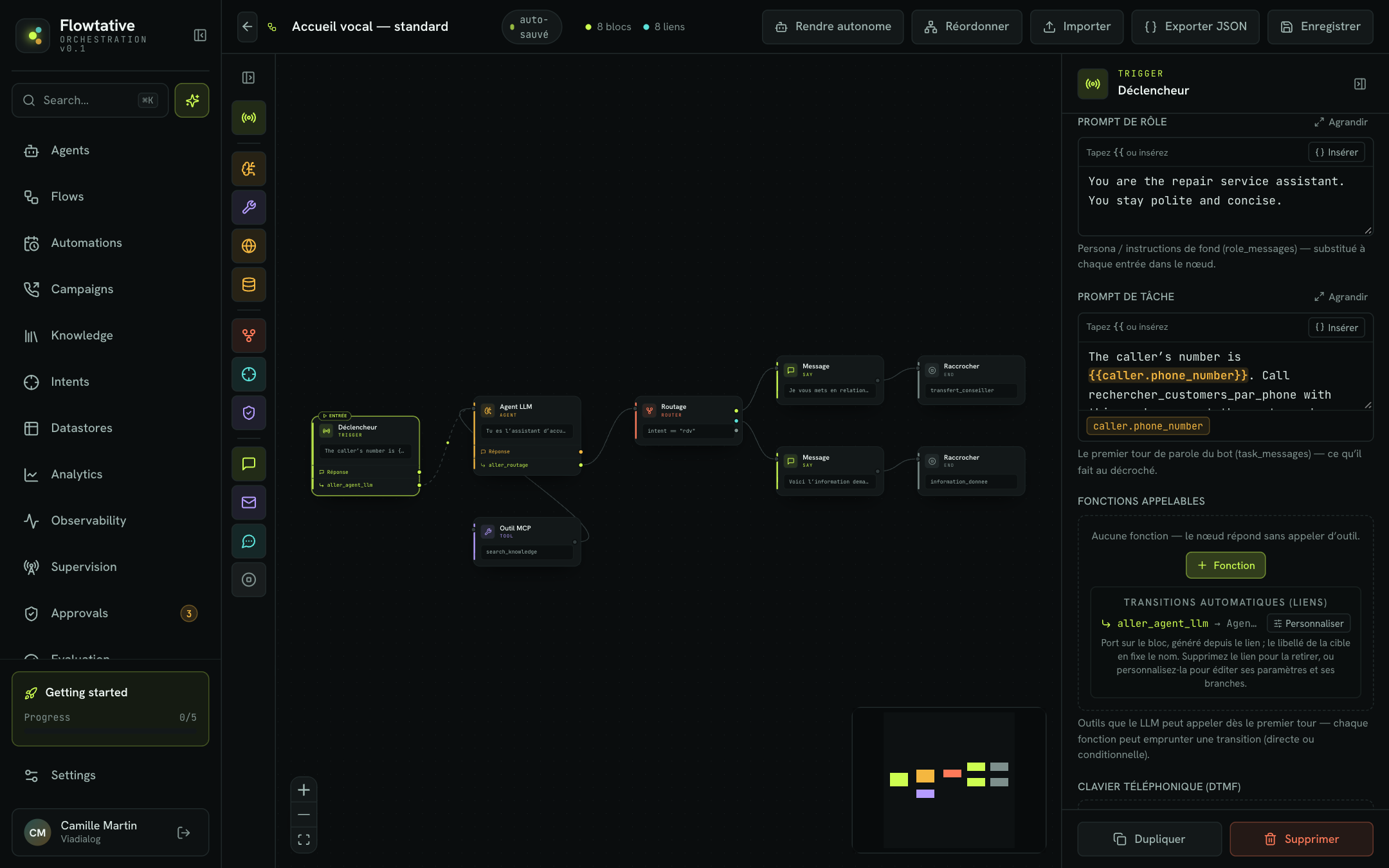
There is no "greeting message" field in the agent's configuration: the greeting is the flow's first speaking turn. It is set in the Trigger block:
- the Role prompt sets the persona (who is speaking, in what tone);
- the Task prompt says what the AI does when it picks up: greet, introduce itself, ask the reason for the call.
The AI phrases its greeting itself from these instructions. If a sentence must be said exactly, for example the recording notice, place a Message block right after the Trigger with Recite word for word on and Wait for a reply off: the AI says it and moves on without waiting.
Recognize the caller
Flowtative does not run an action before the call is picked up: the caller is identified during the first turn, by the Trigger.
- In Datastores, generate the Targeted search by field tool on the phone field of your customer base, for example
rechercher_customers_par_phone. - In the Trigger, add a function with exactly that name: the tool runs when the AI calls it.
- In the Task prompt, give the AI the number and the instruction to call the function: "The caller's number is
{{caller.phone_number}}. Start by callingrechercher_customers_par_phonewith this number, then greet the customer by name if they are known." - In the function detail, add a state write
set parameters.customer ← resultto keep the record found and reuse it in the following blocks ({{state.parameters.customer}}).
Important
The number is only available if the call provides it. Before going live, place a real call in debug mode and check in the transcript (Start variables, Entered "Node" lines) that the caller's number is passed on, and under which name. See Variables and dynamic data.
Tip
Cover the case of an unknown or withheld number in the prompt: "If no customer is found, ask for their name and postcode."
During the call
During the conversation, the AI leads each step with the conversational blocks (LLM agent, Message) and acts on your systems in two ways.
| Way of acting | When the action happens | Examples |
|---|---|---|
| Callable function named after a tool | When the AI decides to call it, with the arguments it has collected | Look up an order, check eligibility, create a request |
| Action block: MCP tool, Datastore, SMS, Email | Every time, as soon as the block is entered, without the AI | Create a ticket, record the request, send a confirmation SMS |
Choose a function when the action depends on what the caller says, and an action block when it must happen for sure at that point of the journey. An action block must always be linked to a next block (otherwise it shows the No next step badge).
For a decision the AI must not take alone (refund, commercial gesture), the Human validation block puts the conversation on hold and submits the request to an operator in the Approvals console. The flow resumes through Decision received, or through Timeout if nobody decided within the delay.
What the AI learns along the way (reason, contract number, search result) is stored in the flow's variables through state writes. See Collect information.
At the end of the call
The Hang up block ends the conversation. It can:
- say a Farewell message as is, without going through the model;
- transfer the call to an advisor with the Call transfer shortcut of its End parameters (see Transfer to an advisor);
- pass on End parameters: key → value pairs, fixed or read from the conversation's variables, recorded on the session's transcript.
Plan one Hang up block per outcome of the journey (request handled, transfer, caller not identified): each carries its own message and its own parameters.
After the call
| Need | Where to find it |
|---|---|
| Receive the conversation in your CRM or ticketing tool | An end-of-session webhook attached to the agent sends the full, signed transcript of each call session. See Webhooks. |
| Read the conversation, the tool calls and the summary | Transcripts. The Summary shows when the platform provides one. See Transcripts. |
| Replay the call | Recording section of the transcript, if the Call recording option is on for the agent. |
| Understand the path taken in the flow | The transcript's diagnostic log, in debug mode. |
| Score the quality of the conversation | Evaluation grids and AI judge. See Evaluations. |
| Track volumes, resolution and handoffs | Analytics. See Analytics. |
Note
Only callbot call sessions are sent to end-of-session webhooks.
Complete example: home repair service
A repair company takes calls from customers reporting a breakdown. The agent must recognize the customer, record the request, confirm by SMS and hand over to an advisor for emergencies. The following already exist:
- a
customersdatabase (fieldsphone,name,address) with therechercher_customers_par_phonetool; - a
requestsbase (fieldsphone,reasonandurgent, the latter as Text: "yes" or "no") with theajouter_requeststool; - a
CRMwebhook created in Settings > Webhooks.
Greet and identify
Trigger block:
- Role prompt: "You are the repair service assistant. You stay polite and concise."
- Task prompt: "The caller's number is
{{caller.phone_number}}. Callrechercher_customers_par_phonewith this number, greet the customer by name if they are known, then ask what the breakdown is." - Function
rechercher_customers_par_phone, state writeset parameters.customer ← result.
Link its Start output to the next block.
Record the request
LLM agent block "Qualification":
- Task prompt: "Have the customer describe the breakdown and ask whether there is an immediate risk (water leak, gas smell). Then call
ajouter_requestswith the number{{caller.phone_number}}, the reason and the urgency." - Function
ajouter_requests, with the state writesset parameters.reason ← args.reason,set parameters.urgent ← args.urgentandset parameters.phone ← args.phone. - Conditional Output: branch
state.parameters.urgent= equal toyesto "Transfer advisor", otherwise fallback to "SMS confirmation".
Confirm by SMS
SMS block "SMS confirmation": Number state.parameters.phone, a confirmation Message text, Reference repair-request. Link its Sent output to the "End" Hang up block.
Wrap up or transfer
- Hang up block "End": Farewell message "Your request is recorded, a technician will call you back. Have a nice day.", End parameters
reason→state.parameters.reason(aspath) andendReason→request_recorded. - Hang up block "Transfer advisor": Farewell message "I'm putting you through to an advisor right away.", Call transfer to the on-call number in BRIDGE,
endReason→emergency.
Use the call
- In the agent, Linked flow section, choose this flow; Webhooks section, tick
CRM; save. - After a test call, open Transcripts: you see the call to
rechercher_customers_par_phone, the call toajouter_requestsand, in debug mode, the writes ofreasonandurgent. - Create an evaluation grid that checks the agent did ask whether there was an immediate risk.
Tip
Test the journey in the agent's tester before publishing it: add the test variable caller.phone_number with the number of a customer in your base to simulate a known caller. See Test an agent.
Best practices
- Design the outcomes first. List the possible endings (handled, transferred, callback promised) and create a Hang up block for each before drawing the rest.
- A certain action = an action block. If an SMS must go out for every recorded request, use an SMS block rather than relying on the AI to call a function.
- Keep track of what matters in the End parameters (reason, outcome): this is what stays attached to the session once the call is over.
- Test with debug mode, then read the diagnostic log in Transcripts to check the path taken.