Live supervision
Follow your AI agents' ongoing calls and conversations in real time, line by line.
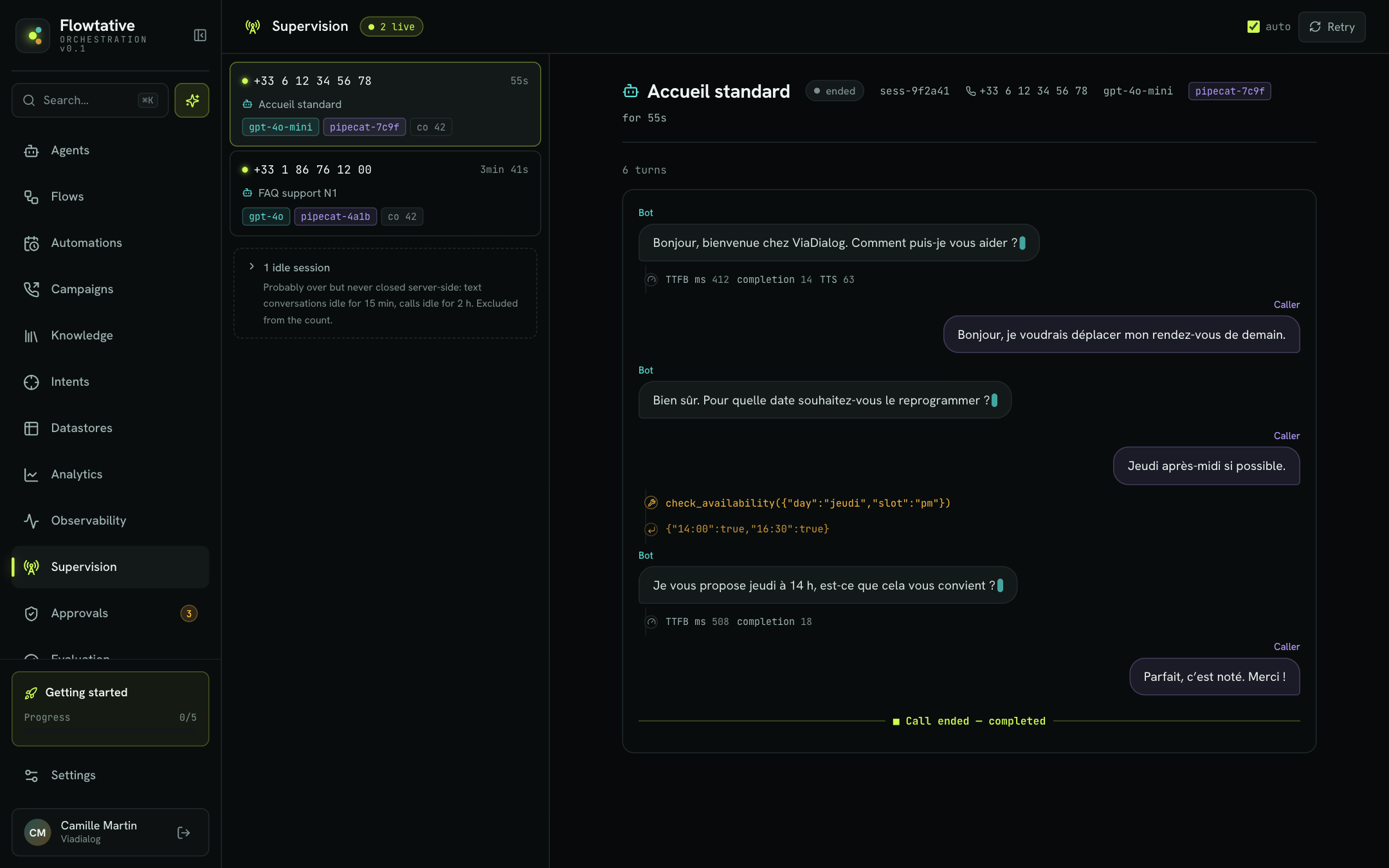
The Supervision page lists ongoing calls and conversations and lets you follow one live: what the customer says, what the agent answers, the tools it calls and any interruptions. It is the AI-agent equivalent of a call center supervisor listening in.
Open it from the sidebar, Supervision entry.
Note
Supervision is read-only: you watch the conversation, without being able to step in or take over the call.
Ongoing calls list
The left panel lists active sessions. The N live counter in the header shows how many sessions are in progress.
Each card shows:
| Element | Description |
|---|---|
| Identifier | The caller's number for a call, otherwise the session identifier. A bubble icon marks a written conversation (chat). |
| Duration | Time elapsed since the session started (for example 47s or 3min 33s), or just now. |
| Agent | Name of the agent handling the session. |
| Badges | The language model used and technical information about the session. |
Refresh
The list refreshes automatically every 3 seconds while the auto box is checked. Uncheck it to freeze the list, then use Retry to reload it manually.
Idle sessions
Some sessions stay open although they are probably over: a written conversation the customer left without closing it, or a call whose end was not reported. They are grouped under N idle sessions at the bottom of the list and excluded from the counter.
| Channel | Considered idle after |
|---|---|
| Chat | 15 minutes without an exchange |
| Voice | 2 hours without activity |
Click N idle sessions to show them. Their card then reads idle for followed by the duration.
Follow a conversation
- Click a card in the list.
- The main panel header shows the agent name, the connection status, the session identifier, the caller's number, the model and the duration (for …).
- The thread fills up as the conversation goes on. It scrolls down automatically; if you scroll up to reread, auto-scroll pauses until you return to the bottom.
The number of turns exchanged appears above the thread.
Connection status
| Status | Meaning |
|---|---|
| connecting… | Opening the live feed. |
| live | The thread receives exchanges in real time. |
| reconnecting… | Temporary network drop: the feed recovers on its own, without losing or duplicating what is already shown. |
| ended | The session is over. |
| closed | Following is no longer possible (session gone or access denied). The calls list is reloaded. |
| idle | No session selected. |
Reading the thread
| Element | Description |
|---|---|
| Bot bubble (left) | The agent's answer. It is written out as it is spoken; a blinking cursor shows the line is in progress. |
| Caller bubble (right) | What the customer said (transcription of their speech) or wrote. |
| Tool line (wrench) | A tool call by the agent, with its name and arguments. |
| Return line (arrow) | Result returned by the tool. |
| Metrics line (gauge) | Technical measurements for the turn: TTFB ms (delay before the first word of the answer), prompt and completion tokens, number of characters read in TTS. |
| interruption line (lightning) | The customer cut the agent off. |
| Server line | Technical message emitted during the session. |
| Call ended — reason | End of the session, with the end reason. |
Tip
Repeated interruptions at the same point in the conversation often mean a line is too long: shorten it in the prompt or in the relevant flow block.
Error messages
| Message | Likely cause |
|---|---|
| No active calls. | No active session at the moment. |
| Not authorized for this company. | Your account does not have access to supervision for this company. |
| Supervision unavailable in this environment. | The feature is not deployed in the environment you use. |
| Could not load calls. | Temporary error: click Retry. |
Best practices
- Listen to the first calls after going live. Following a few real conversations quickly reveals a misunderstood phrasing or a slow tool.
- Keep an eye on the metrics. A TTFB rising during a call means silences for the customer.
- Follow up with transcripts. Once the call is over, find it in Transcripts to replay and export it.