Block reference
The role, fields and a usage example for each block type of the flow editor.
This page describes every block offered in the editor's Library, in the order of its categories. For each block: its role, its outputs, the table of its fields and an example from customer service. Settings shared by several blocks (callable functions, phone keypad, dynamic values) are described at the end of the page.
Every block also has a Block label field at the top of the configuration panel. It is shown on the canvas and names the automatic transitions that lead to this block.
Overview
| Category | Block | Tag | In one sentence |
|---|---|---|---|
| Entry | Trigger | TRIGGER | The AI's first speaking turn, when the call is picked up or the chat opens. |
| Intelligence | LLM agent | AGENT | A step led by the AI, with its prompt and functions. |
| Intelligence | MCP tool | TOOL | Runs a tool when the block is entered, without going through the AI. |
| Intelligence | HTTP request | HTTP | Describes a call to an external API. |
| Intelligence | Datastore | DATA | Searches, adds or updates a record in a database. |
| Logic | Routing | ROUTER | Describes a two-case conditional branch. |
| Logic | Human validation | HITL | Puts the conversation on hold until an operator decides. |
| Output | Message | SAY | Has the AI say a message. |
| Output | MAIL | Sends a notification email. | |
| Output | SMS | SMS | Sends a notification SMS. |
| Output | Hang up | END | Ends the conversation, with or without a transfer. |
Trigger
The Trigger is the starting point of the flow. It is a full AI speaking turn: it defines who the AI is, what it does when it picks up, and the functions it can call from the very first exchange. A flow created with New flow already contains one.
Output: Start, then one row per function and per automatic transition.
| Field | Description | Default value |
|---|---|---|
| Channel | Channel intended for the flow: Voice call, Chat or Webhook. | Voice call |
| Role prompt | The persona and background instructions, applied each time the block is entered. Accepts {{…}} variables. | Empty |
| Task prompt | What the AI does when it picks up: its first speaking turn. Accepts {{…}} variables. | Empty |
| Callable functions | The functions the AI can call from the first turn. See Callable functions. | None |
| Phone keypad (DTMF) | Keypad input settings for this block. See Phone keypad. | Platform defaults |
Example — Health insurer switchboard:
- Role prompt: "You are the front-desk assistant of Horizon Health Insurance. You address the caller formally and stay concise."
- Task prompt: "Greet the caller, mention that the call may be recorded, then ask the reason for their call."
Task prompt, system prompt or Message block? See Welcome message or prompt?.
LLM agent
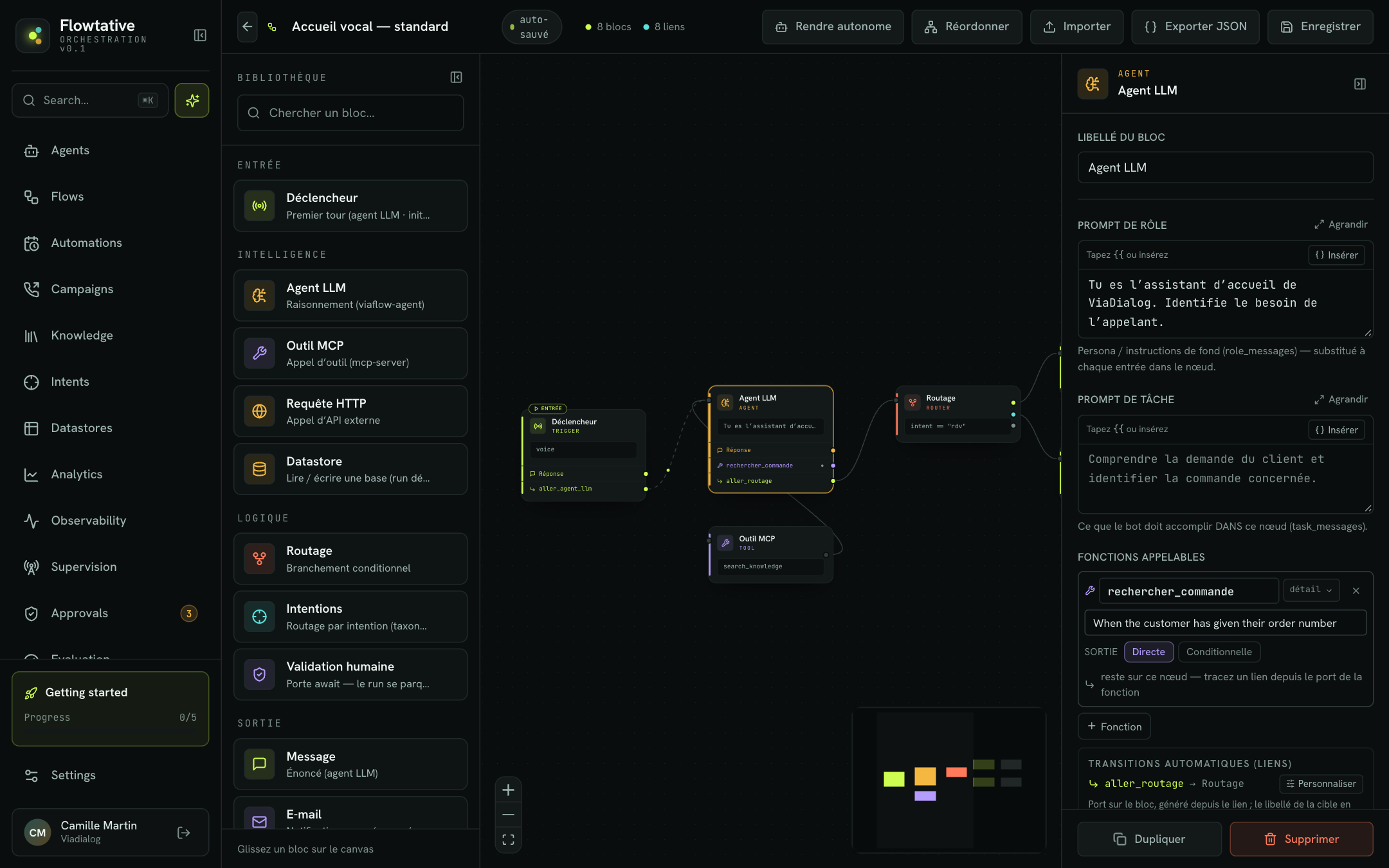
The LLM agent block is a conversational step: the AI carries on the exchange following the block's prompt, can call functions, then moves to the next block. It is the most used block in a flow.
Output: Reply, then one row per function and per automatic transition.
| Field | Description | Default value |
|---|---|---|
| Role prompt | Persona and background instructions, applied each time the block is entered. Accepts {{…}} variables. | Empty |
| Task prompt | What the AI must achieve in this step. Accepts {{…}} variables. | Empty |
| Callable functions | The functions the AI can call from this block. See Callable functions. | None |
| Phone keypad (DTMF) | See Phone keypad. | Platform defaults |
Note
The model and temperature are not set in the block: they are those of the agent running the flow. See Create an agent.
Example — Order tracking:
- Task prompt: "Ask the customer for the order number, then call
rechercher_commande. Give the status and the expected delivery date." - Function
rechercher_commande, with a state write that keeps the status inparameters.statut_commande.
MCP tool
The MCP tool block runs a tool as soon as the block is entered, without going through the AI, then continues to the block linked to its output. Use it for a systematic action: create a ticket in your support tool, log a callback, query your CRM.
Output: Result. It must be linked, otherwise the block shows No next step.
| Field | Description | Default value |
|---|---|---|
| Tool | The tool to run. Choose a tool… opens the catalog: your tools (Tenant tools group) then those of each connected MCP server, with a search. | None |
| Arguments (JSON) | The arguments passed to the tool, in JSON. Accepts {{…}} variables. | {} |
Once the tool is chosen, a Parameters card lists its parameters (mandatory ones are marked required). Generate args rewrites the Arguments (JSON) field with these parameters, ready to fill in.
If no MCP server is connected and the catalog is empty, the block offers manual entry of the MCP server and Tool fields. MCP servers are connected in Settings > MCP servers (see MCP servers).
Example — After a complaint, an MCP tool block systematically creates a ticket in your support tool, then continues to a confirmation Message.
HTTP request
The HTTP request block describes a call to an external API.
Outputs: Success (2xx) and Error / timeout.
| Field | Description | Default value |
|---|---|---|
| Method | GET, POST, PUT, PATCH or DELETE. | GET |
| URL | The called address, for example https://api.exemple.com/v1/commandes/{{orderId}}. | Empty |
| Headers (JSON) | The HTTP headers, in JSON. | {} |
| Body (JSON) | The request body. Ignored for GET and DELETE. | Empty |
| Timeout (ms) | Maximum response time, in milliseconds. | 10000 |
| Output variable | The name under which the JSON response is exposed to the next blocks. | Empty |
Warning
The settings of the HTTP request and Routing blocks are kept with the flow, but they are not executed during a conversation. To call an API, create an HTTP / API tool (see Tools) and call it from a function or an MCP tool block.
Datastore
The Datastore block reads from or writes to one of your databases as soon as the block is entered, without going through the AI. The form adapts to the schema of the chosen database.
Output: Next. It must be linked, otherwise the block shows No next step.
| Field | Description | Default value |
|---|---|---|
| Database | The target database. Contact bases are flagged with "· contacts". | None |
| Operation | Search, Add or Update. | Search |
| Target field | (Search) The field the search runs on, or — free filter —. A target field is the most reliable option. | Free filter |
| Searched value | (Search, with a target field) The searched value, for example state.parameters.email. The search is a "contains" match. | Empty |
| Filter | (Search, free filter) A filter in the field,operator,value format, for example email,cr,@exemple.fr. Operators: cr, sw, ed, eq, ne, gt, ge, lt, le. | Empty |
| Record identifier | (Update) The record identifier, returned by an earlier search, for example state.parameters.record_id. | Empty |
| Record fields | (Add, Update) One line per database field. | Empty |
| Result variable | The name under which the result is stored (state.parameters.<name>), reusable in prompts and next blocks. | Empty |
Each value is a fixed text or a state.* path read at run time.
Warning
Update replaces the whole record: a field left empty is lost. Fill in every field, changed or not, for example from the result of an earlier search.
The How this block runs box shows the tool used for the chosen operation. If that tool does not exist yet in your workspace, a warning appears with the Create the tool now button. The Manage this database's tools (Datastores page) link opens the database. See Datastores.
Example — Identifying a customer:
- An LLM agent asks for the customer's email and stores it in
parameters.email. - A Datastore block: Database "Customers", Operation Search, Target field
email, Searched valuestate.parameters.email, Result variableclient. - The next LLM agent greets the customer with
{{state.parameters.client}}in its prompt.
Routing
The Routing block describes a conditional branch with two cases plus a default case.
Outputs: Case A, Case B, Otherwise.
| Field | Description | Default value |
|---|---|---|
| Condition (case A) | The condition of the first case, for example status == "premium". | Empty |
| Condition (case B) | The condition of the second case, for example status == "standard". | Empty |
Warning
As with the HTTP request, these conditions are not evaluated during a conversation. To route a journey, use a function with a Conditional Output (see Callable functions).
Human validation
The Human validation block pauses the conversation until an operator decides, for example to approve a goodwill gesture. The request appears in the approvals queue; the flow resumes as soon as the decision is made, or when the timeout expires.
Outputs: Decision received and Timeout.
| Field | Description | Default value |
|---|---|---|
| Title | The title shown in the approvals queue, for example "Approve the refund". | Empty |
| Instructions for the approver | What the operator must check. | Empty |
| Context shown to the approver | Label → value lines shown to the operator. Each value is a fixed text or a path read from the conversation (abc / path button), for example state.parameters.orderId. | None |
| Decision fields | The form the operator fills in. Without fields, the approval is a simple sign-off. | None |
| Max delay (s) | Without a decision within this delay, the Timeout output is taken. Empty: waits with no deadline. | 300 |
Each Decision field includes:
| Setting | Description |
|---|---|
| Name | Field identifier (letters, digits and _), for example decision. submitted_by and submitted_at are reserved. |
| Type | Text, Integer, Number or Yes / No. |
| Label | The text shown to the operator. |
| Choices | (Text) The allowed values separated by commas, for example APPROVE, REJECT. Empty: free input. |
| Default value | Optional: fixed text or path (abc / path). |
| required | Makes the field mandatory. |
The decision is then available to the next blocks under result.<name>.
Distribute to a ViaFlow agent
Check Distribute to a ViaFlow agent to hand the approval over to the agents of a service: an approval task is created and distributed, and the flow waits for their decision or the timeout.
| Field | Description |
|---|---|
| Service | Mandatory. The service whose agents receive the task. Without a service, the approval stays in Flowtative. |
| Agent group | Kept in the flow but not passed on yet: distribution is by service only. |
| Task subject | The subject shown to the agents. Empty: the block title. |
A distributed task must expire: without a Max delay, 300 seconds apply. The task number is kept in state.parameters.approval_case_id; on the Timeout output, call the expireApproval tool with this number to close the task.
Example — Goodwill gesture: Title "€30 credit note", Context "Customer" → state.parameters.client, a decision field of type Text with the choices GRANT, REFUSE, Max delay 600. Decision received leads to an LLM agent that announces the decision, Timeout to a Message promising a callback.
See Human approvals.
Message
The Message block has the AI say a message. By default, the AI phrases it naturally in the context of the conversation; it can also recite it word for word.
Output: Next.
| Field | Description | Default value |
|---|---|---|
| Message to say | The instruction for what to say. Accepts {{…}} variables. | Empty |
| Recite word for word | Enforces the exact text, without rephrasing or translation: legal notices, GDPR information… | Off |
| Tone / persona | Adjusts the tone without changing the message. Folded behind + Tone / persona. | Empty |
| Wait for a reply | Off: purely informative message, the AI says it then moves on in the same turn, without waiting for a reply. | On |
| Phone keypad (DTMF) | See Phone keypad. | Platform defaults |
Example — Recording notice: "This call may be recorded to improve the quality of our services.", Recite word for word on, Wait for a reply off. See also Welcome message or prompt?.
The Email block sends a notification email as soon as the block is entered. The recipient cannot reply to it within the conversation.
Output: Sent. It must be linked, otherwise the block shows No next step.
| Field | Description | Default value |
|---|---|---|
| Email service | Mandatory. The sending service, picked from the list (Choose an email service…) or typed in. | Empty |
| Sender | Mandatory. The sender address, for example no-reply@societe.com. | Empty |
| Recipient | The recipient address, fixed or read from the conversation (state.parameters.email). | Empty |
| Subject | The email subject. | Empty |
| Body (HTML) | The content, in HTML. For dynamic content, enter a state.parameters.… path. | Empty |
Example — Appointment confirmation: Recipient state.parameters.email, Subject "Your appointment is confirmed", then a Hang up block.
SMS
The SMS block sends a notification SMS as soon as the block is entered. The recipient cannot reply to it within the conversation.
Output: Sent. It must be linked, otherwise the block shows No next step.
| Field | Description | Default value |
|---|---|---|
| Sender | Mandatory. The number or alphanumeric name shown to the recipient, for example FLOWTATIVE. | Empty |
| Number | The recipient's number, fixed (+33612345678) or read from the conversation (state.parameters.callerNumber). | Empty |
| Message text | The SMS content. One SMS segment holds 160 characters. For dynamic content, enter a state.parameters.… path. | Empty |
| Reference | Mandatory. A free label kept to trace the sending. | Empty |
For the Email and SMS blocks, a warning appears in the panel if the matching sending tool is not declared in your workspace: the flow would fail on load.
Example — After an order tracking call, an SMS sends the tracking link to the caller's number, with the Reference "order-tracking".
Hang up
The Hang up block ends the conversation. It can say a farewell message, transfer the call to an advisor and pass on end-of-call information.
Output: none.
| Field | Description | Default value |
|---|---|---|
| Farewell message | Said as is when the block is entered, without going through the model. Empty: silent hang-up. For a farewell phrased by the AI, place an LLM agent before this block. | Empty |
| End parameters | Key → value pairs passed on at the end of the conversation. See below. | None |
| Closing reason | A short reason, for example resolved, shown on the block in the canvas. | Empty |
End parameters
- Call transfer adds in one click the Transfer number (
transferNumber) and Transfer mode (transferMode) keys. On a voice call, they transfer the caller to that number. - Transfer mode: BRIDGE (bridge: the bot stays on the line) or REFER (SIP referral: the bot leaves the call).
- Free parameter (Parameter once a row exists) adds a key of your choice; the
endReasonkey is shown with the label End reason. A key contains only letters, digits and_; a duplicate key is flagged. - Each value is a fixed text (
abc) or a path read from the conversation (path), for examplestate.parameters.orderId.
In chat, end parameters are received with the end of the session. They are also recorded on the transcript and available in analytics. A value set here is never overwritten by the AI. For a complete journey, see Transfer to an advisor and Collect information.
Example — Complaint: Farewell message "I'm putting you through to an advisor, have a nice day.", Call transfer to +33123456789 in BRIDGE, and an endReason parameter = complaint.
Shared settings
Callable functions
The Trigger and LLM agent blocks offer a list of functions the AI can call. A function serves three purposes, which can be combined:
- calling a tool: when the function name matches the identifier of one of your tools, the tool is run;
- storing information through state writes;
- changing step through its output.
Click + Function to add one, then fill in:
| Setting | Description |
|---|---|
| Name | The function name, for example rechercher_client. Your tool identifiers are suggested as you type. A duplicate name is flagged. |
| Description | When to call it? The description the AI reads to decide whether to call the function. |
| Detail | The detail (or N params) button unfolds the arguments, state writes and HTTP submission. |
| Output | Direct: a single target. Conditional: several branches with conditions, plus a fallback. |
Direct output — Draw a link from the function's output handle to the target block. Without a link, the AI stays on the block after the call.
Conditional output — Each Branch carries a condition if <value> <operator> <expected value>:
- observed value: a path, for example
state.parameters.statut_commande; - operators: = equal to, ≠ not equal to, < less than, ≤ less or equal, > greater than, ≥ greater or equal, ∈ in the list, ∉ not in list (lists in the form
a, b, c); - the first true condition wins: the order of the branches is their priority (arrows to move up or down);
- the otherwise fallback is mandatory: draw a link from its output handle.
Each branch and the fallback have their own output handle on the block.
Function detail:
| Section | Description |
|---|---|
| Arguments (provided by the LLM) | The arguments the AI fills in, with their type and constraints. Read-only. |
| State writes (after execution) | The information stored after the call, in order. Operations: set (assigns), append (adds to a list), merge (merges an object), delete (removes the key). The path starts with parameters.; the value is a fixed text or an args.* (call argument), result.* (tool return) or state.* path. |
| HTTP submission (submit) | The HTTP submission attached to the function, if any. Read-only. |
| JSON | Shows the full function definition. |
Example — Function verifier_eligibilite, description "Call this function once the customer has given their contract number", write set parameters.eligible ← result.eligible, Conditional output: branch 1 state.parameters.eligible = equal to true to "Offer proposal", fallback to "Refusal explanation".
Phone keypad (DTMF)
The Trigger, LLM agent and Message blocks let you configure phone keypad input. The keypad is always listened to; without settings, the platform defaults apply. Configure a block when it expects a specific input: menu choice, code, contract number.
Click Configure the keypad for this node, then pick a preset or adjust the fields. A box sums up live what the caller will experience.
| Field | Description | Default value |
|---|---|---|
| 1-digit menu (preset) | Immediate delivery on the first key; # is not treated as a terminator. | — |
| 4-digit code (preset) | 4 digits expected, default delays and terminator. | — |
| Expected length | Number of expected digits, for example 4 for a code. Empty: free input. A shorter or longer input is reported to the AI as an error. | Free input |
| Inter-digit delay | Silence after the last digit before delivery, from 0.5 to 10 s. | 3 s |
| End-of-sequence delay | Delay after the last expected digit, from 0 to 2 s; 0 = immediate delivery. Only active with an expected length. | 500 ms |
| Terminator | Default (#), # — hash, * — star or Off (timers only). | # |
| The 1st key interrupts the bot | On: pressing a key interrupts the AI. Off: the input is delivered after its sentence. | On |
The reset icon next to a delay restores the default value; the cross at the top of the box removes all settings.
Fixed values and paths
Several blocks accept, for the same value, either a fixed text or a path read at run time:
| Prefix | What it refers to |
|---|---|
state.parameters.… | Information stored during the conversation (state write, result variable). |
args.… | An argument provided by the AI when calling a function. |
result.… | The return of the tool or decision that has just run. |
Datastore blocks only accept state.* paths. Field-by-field details are in Variables and dynamic data.
Learn more
The visual editor
Build a flow in the editor, link blocks, configure each step and use the shortcuts.
Tools
Create tools, test them, use them in a flow and link them to an agent.
Datastores
Create structured data tables, define their fields, import your CSV files and make them available to your agents and flows.
The life of a call
Connect Flowtative's building blocks before, during and after a call, with a complete end-to-end flow example.