Analytics
Measure the volume, resolution, handoffs and abandons of your callbots and chatbots, and spot where conversations drop off.
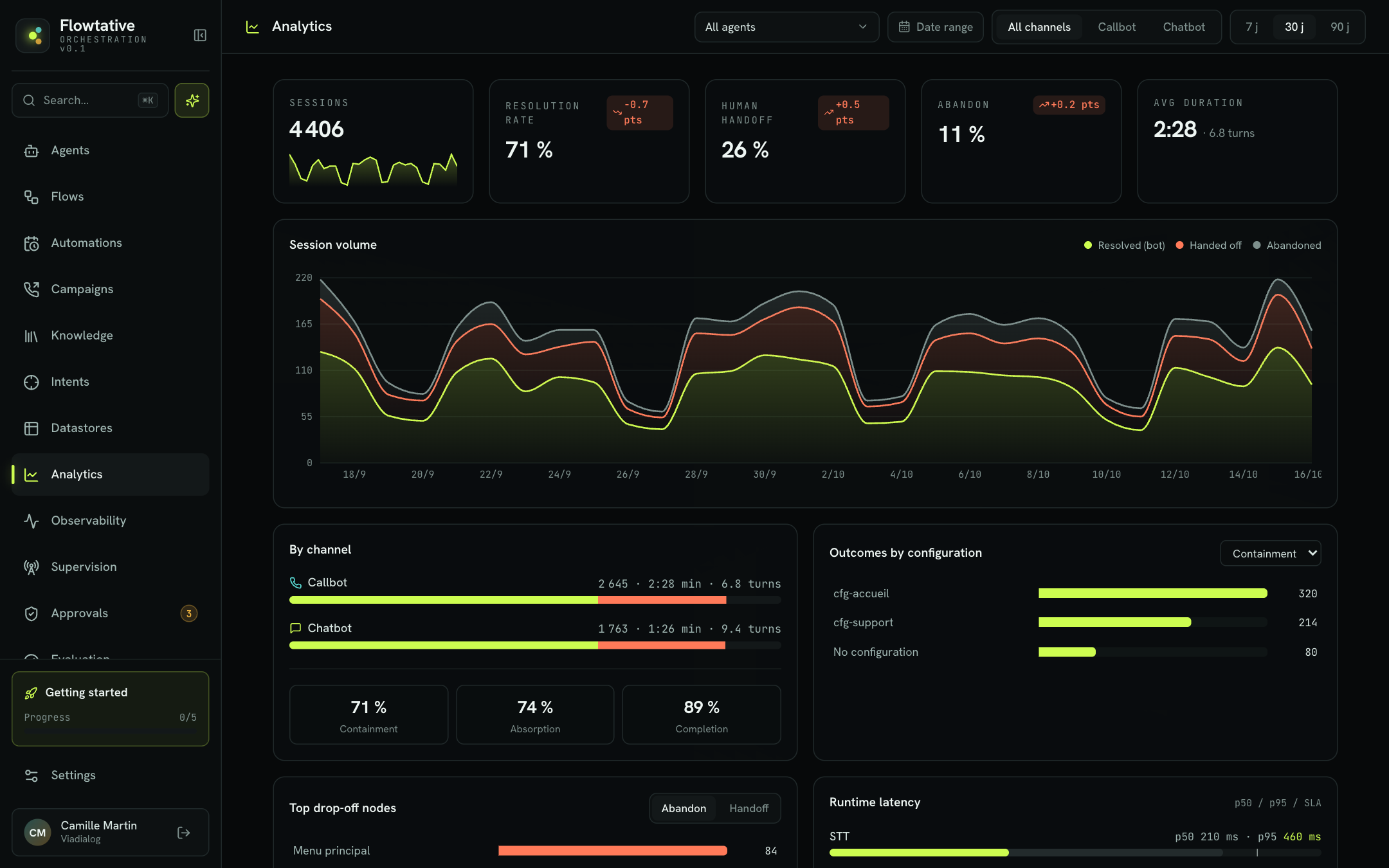
The Analytics page answers the questions a customer service manager asks: how many sessions your AI agents handled, how many were resolved without an advisor, how many were handed off or abandoned, and at which point in the journey. It brings together key metrics, trend charts and a session-by-session drilldown.
Open it from the sidebar, Analytics entry.
Page filters
All filters sit in the header and apply to every panel. Each panel reloads independently: a loading indicator appears in its header while it updates.
| Filter | Description | Default |
|---|---|---|
| Agent | Searchable drop-down (Filter by agent). Restricts the figures to a single agent. Choose All agents to return to the global view. | All agents |
| Date range | Calendar to pick an exact range (from … to …). Click the start date, then the end date, then Apply. The range replaces the duration buttons. | None |
| Channel | All channels, Callbot (voice calls) or Chatbot (written conversations). | All channels |
| Duration | 7 j, 30 j or 90 j (days): a rolling window ending at the end of the current day. Clicking a duration clears the exact range. | 30 j |
Note
Days are computed in Coordinated Universal Time (UTC). A session started at 00:30 Paris time in summer is counted on the previous day.
Key metrics
Five cards summarize the selected period. The three rates show a change in points ("pts") against the previous period of the same length: for example, with the 30 j filter, the comparison covers the 30 days before. The change is green when the trend is favorable, orange otherwise.
| Metric | What it measures | Reading the change |
|---|---|---|
| Sessions | Total number of sessions (calls or conversations) in the period, with a daily trend line. | — |
| Resolution rate | Share of sessions handled end to end by the agent, with no handoff to an advisor. | An increase is favorable. |
| Human handoff | Share of sessions transferred to an advisor or a queue. | A decrease is favorable. |
| Abandon | Share of sessions interrupted before completion (hang-up, disconnection, inactivity). | A decrease is favorable. |
| Avg duration | Average session duration (minutes:seconds), followed by the average number of exchange turns. | — |
Each session gets one of these three outcomes, used in every chart:
- Resolved (bot): the agent took the conversation to its end.
- Handed off: the session was passed to a human.
- Abandoned: the session stopped without completing.
Session volume
The Session volume chart stacks, day by day, the Resolved (bot), Handed off and Abandoned sessions. Use it to spot a call peak (campaign launch, incident) or a gradual decline in resolution.
By channel
The By channel panel compares Callbot and Chatbot: for each channel, the number of sessions, the average duration and the average number of turns, plus a bar showing the resolved share (green) and the handed-off share (orange).
At the bottom of the panel, three rates complete the picture:
| Rate | Description |
|---|---|
| Containment | Share of sessions resolved by the agent. Same as the Resolution rate card. |
| Absorption | Share of sessions that did not reach an advisor (resolved or abandoned). Measures the load taken off your teams. |
| Completion | Share of sessions that ended cleanly, through a resolution or a handoff, rather than an abandon. |
Tip
A high absorption rate with a low containment rate often points to abandons: your customers hang up before getting an answer, without reaching an advisor either.
Outcomes by configuration
The Outcomes by configuration panel ranks your agents by the metric chosen in the panel's drop-down: Containment, Absorption or Completion. Use it to compare agents, for example your main reception agent and your appointment booking agent. Sessions with no identified agent appear under No configuration.
Top drop-off nodes
The Top drop-off nodes panel shows the flow steps where sessions end. Switch between:
- Abandon: the steps where your customers leave the conversation;
- Handoff: the steps from which handoffs to an advisor start. See Track transfers.
Example: if the "Identity check" step concentrates abandons, the question is probably too long or poorly understood over the phone.
Runtime latency
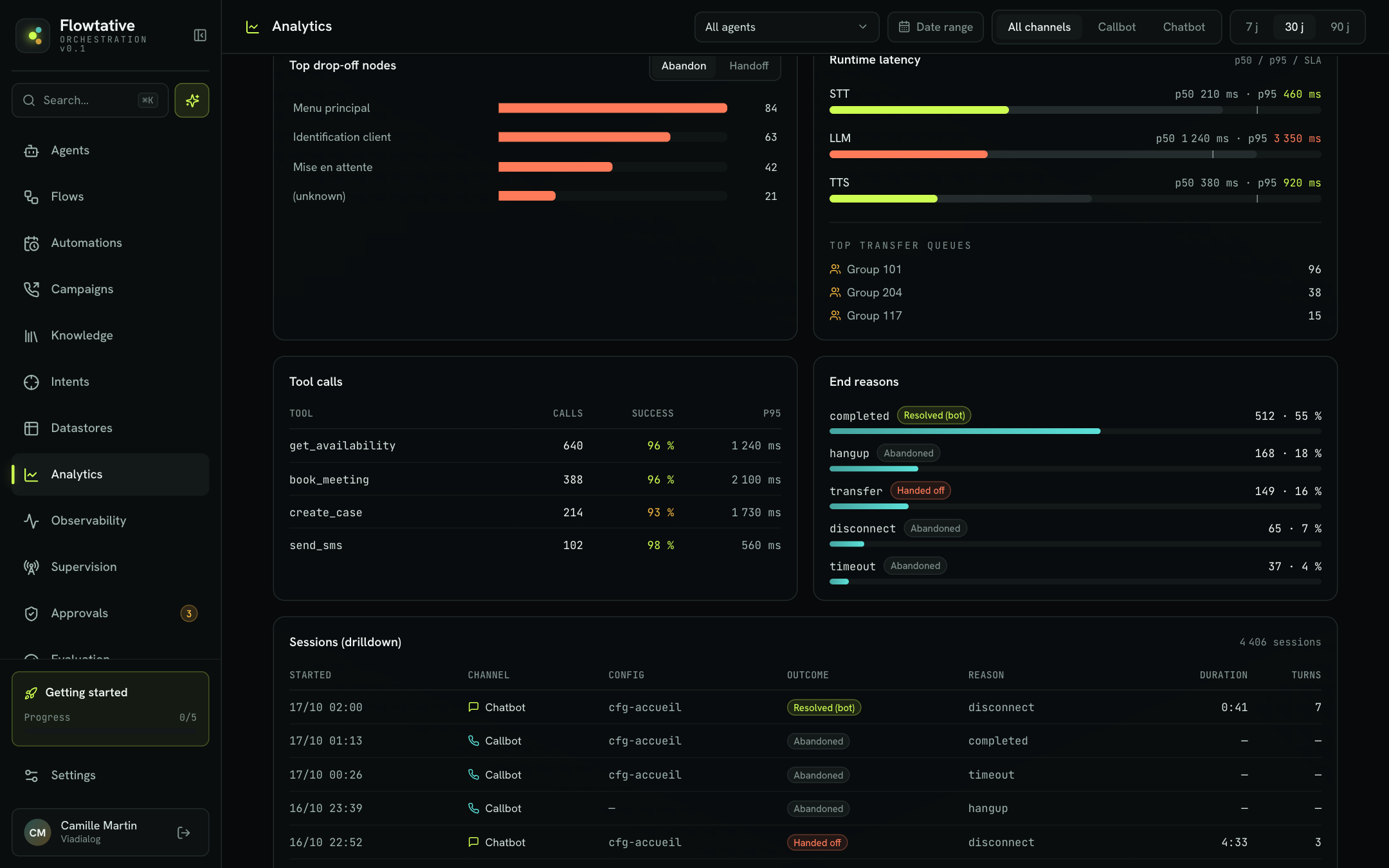
The Runtime latency panel measures the response time of the three building blocks of a voice agent:
| Block | Role |
|---|---|
| STT | Speech-to-text: turning the customer's speech into text. |
| LLM | Response generation by the language model. |
| TTS | Text-to-speech: reading the response to the customer. |
For each block, the bar shows two values:
- p50 (colored part): the median latency, half of the responses are faster;
- p95 (gray part): 95% of the responses are faster, which reflects the slowest cases your customers experience.
A vertical line marks the reference threshold (SLA). The p95 value turns orange when it exceeds this threshold.
Below the latencies, the Top transfer queues list shows, when handoffs occurred, the five most requested destination groups (Group followed by its number) and the number of handoffs received.
Tool calls
The Tool calls table lists the eight tools your agents use most (calendar lookup, knowledge base search, ticket creation, etc.).
| Column | Description |
|---|---|
| Tool | Name of the tool called. |
| Calls | Number of calls in the period. |
| Success | Share of successful calls: green from 95%, yellow between 80% and 95%, orange below 80%. |
| p95 | Execution time under which 95% of calls fall, in milliseconds. |
End reasons
The End reasons panel details how sessions ended. Each row shows the end code (for example completed, hangup, transfer, timeout), the matching outcome (Resolved (bot), Handed off or Abandoned), the number of sessions and their share.
Sessions (drilldown)
The Sessions (drilldown) table lists the sessions in the period, newest first, 10 per page. The total number of sessions appears in the table header.
| Column | Description |
|---|---|
| Started | Session start date and time. |
| Channel | Callbot or Chatbot. |
| Config | Identifier of the agent configuration that handled the session. |
| Outcome | Resolved (bot), Handed off or Abandoned. |
| Reason | Session end code. |
| Duration | Session duration (minutes:seconds). |
| Turns | Number of exchange turns. |
To review a specific conversation, use the Transcripts page.
Best practices
- Compare like with like. Point changes are computed against the previous period of the same length: keep this in mind before comparing a campaign launch week with a quiet week.
- Start from drop-off nodes. When the abandon rate rises, the Top drop-off nodes panel tells you where to act in the flow before you touch the prompt.
- Watch p95, not just the average. An LLM p95 above the threshold means noticeable silences on the phone, even if the median stays good.
- Filter by agent before drawing conclusions: a poor global figure may come from a single agent.
Limits
- When no data exists for the selected period and filters, panels show No data for this period.
- The sessions table shows the configuration identifier, not the agent name: filter by agent in the header to isolate a given agent.