Connect a base to an agent
Give an agent access to a knowledge base, in chat and on voice calls, through the search tool added automatically.
A knowledge base is only useful once it is connected to an agent. This page explains how to turn on document retrieval (RAG) in an agent, how to tune result relevance, and what Flowtative does so that the base also works during voice calls.
Before you begin
- You have created and fed a knowledge base, and checked that it returns the right passages with Test semantic search… (see Knowledge bases).
- You have an agent to edit (see Create and configure an agent).
How the agent uses the base
RAG (document-augmented retrieval) works like this: when a customer asks a question, the agent searches the base for the closest passages, then writes its answer from those passages rather than from memory alone. For customer service, this is what lets it give the real opening hours, the real return policy or the real price.
In written conversations, RAG applies directly. On voice calls, it does not: the agent only reaches the base through a search tool it calls when needed. Flowtative creates and connects this tool for you when you save the agent.
Turn on RAG
- Open the agent, then the Knowledge (RAG) section in the editor's left menu.
- Turn on Enable RAG ("The agent queries the knowledge base").
- Choose the Knowledge base. The list offers a search by name.
- Tune the search (see the table below).
- Save the agent.
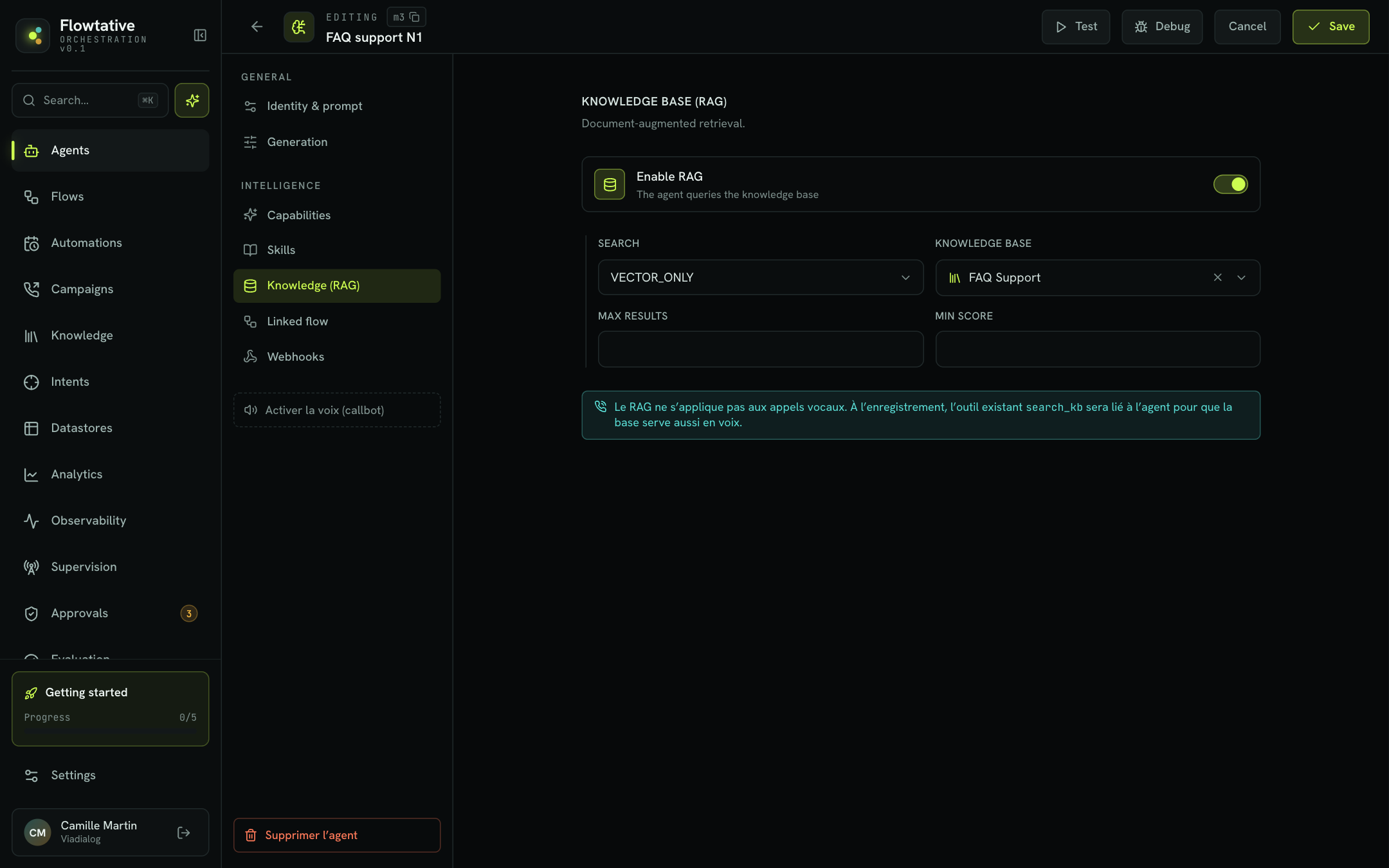
| Field | Description | Default |
|---|---|---|
| Enable RAG | The agent queries the knowledge base. | Off |
| Search | Search method: HYBRID, VECTOR_ONLY, BM25_ONLY, BM25_NORMALIZE_ONLY or HYBRID_CUSTOM. | HYBRID |
| Knowledge base | The base the agent searches. | None |
| Max results | Maximum number of passages returned to the agent (at least 1). | 5 for the search tool if left empty |
| Min score | Minimum relevance score of a passage, between 0 and 1 (steps of 0.1). | 0.3 for the search tool if left empty |
Choose the search method
VECTOR_ONLYcompares the meaning of the question and the passages. It finds "I want to send my parcel back" even if the document talks about "product returns".BM25_ONLYcompares words. It works well on exact terms: plan number, product name, reference.HYBRIDcombines both. It is the default and the right starting point in most cases.
Tune Max results and Min score
- Higher Min score: fewer passages, but more reliable. Useful if the agent quotes off-topic documents.
- Lower Min score: more passages come up. Useful if the agent too often says it doesn't know when the information exists.
- Max results: 3 to 5 passages are often enough for a FAQ. Raise it for questions that require combining several documents.
Test your settings in the base with Test semantic search…, then in the agent tester (see Test an agent).
The search tool added automatically
As soon as a base is selected with RAG on, the Knowledge (RAG) section tells you what will happen on save:
| Message shown | What happens |
|---|---|
| "RAG does not apply to voice calls. On save, a search tool "Recherche KB — base name" will be created and connected to the agent so the base also works in voice." | No tool exists yet for this base: Flowtative creates and connects it. |
| "… the existing tool tool name will be connected to the agent so the base also works in voice." | A search tool already exists for this base: it is reused rather than duplicated. |
| "Base also available on voice calls, through the tool tool name connected to the agent." | The tool is already connected: nothing to do. |
| "The previous base's tool … will be detached from the agent (it remains available in Settings → Tools)." | You changed the base or turned RAG off: the previous base's tool is removed from this agent. |
On save, Flowtative:
- creates the tool if it doesn't exist, named Recherche KB — base name, with an identifier of the form
rechercher_kb_<base_name>; - connects it to the agent and turns on the agent's tool calling;
- makes sure only one search tool per base stays connected to the agent (duplicates are removed);
- detaches the previous base's tool if you changed bases. The tool is not deleted: it stays in Settings > Tools and can be used by other agents.
The tool created takes the agent's settings at creation time: Max results, Min score and search method (HYBRID, VECTOR_ONLY or BM25_ONLY; other methods are converted to HYBRID). Its description tells the agent to use it for any question about the base's content, rather than guessing the answer.
Note
Search tools for other bases that you connected to the agent yourself are left untouched. Only the tool of the base selected in Knowledge (RAG) is managed automatically.
Tip
If you change Max results or Min score after the tool is created, the existing tool keeps its original settings. Adjust it if needed in Settings > Tools.
If saving fails
- "Tool catalog unavailable: the base's search tool could not be connected. Try again.": the tool list could not be loaded. The agent is not saved; try again a moment later.
- "Base search tool not created: … The agent was not saved.": creating the tool failed. The message gives the cause. No change is saved until the tool can be created.
In both cases, the editor takes you back to the Knowledge (RAG) section.
Example: a support agent answering in chat and on the phone
Your customer service has a "Customer service FAQ" base (opening hours, returns, delivery) and an agent "FAQ support N1" used in chat and on your phone number.
- In the agent, Knowledge (RAG) section, turn on Enable RAG and choose "Customer service FAQ".
- Keep Search on
HYBRID, Max results at 5 and Min score at 0.3. - The message says a "Recherche KB — Customer service FAQ" tool will be created. Save.
- In chat, the agent checks the base for every question. On the phone, it calls the
rechercher_kb_customer_service_faqtool when a caller asks "Are you open on Saturdays?".
Best practices
- Say in the prompt when to search. For example: "For any question about opening hours, returns or delivery, check the base before answering. If you can't find the information, offer to transfer to an advisor."
- Test in voice. Voice behavior goes through the search tool: check that it is connected ("Base also available on voice calls…" message) and test a few questions out loud.
- One targeted base per agent. A base that is too broad brings up off-topic passages; several specialized bases give more precise answers.
Learn more
Knowledge bases
Create a knowledge base, feed it with your documents, FAQs, websites and support tools, then check what your agents will find in it.
Create and configure an agent
Create an agent from scratch or from a template, then set its model, prompt, capabilities, knowledge, flow and webhooks.
Tools
Create tools, test them, use them in a flow and link them to an agent.
Test an agent
Talk to an agent in writing or by voice, inject test variables and turn on the diagnostic log before going live.